The step-by-step playbook for producing scroll-stopping UGC content using AI creative direction, at a fraction of the traditional cost.
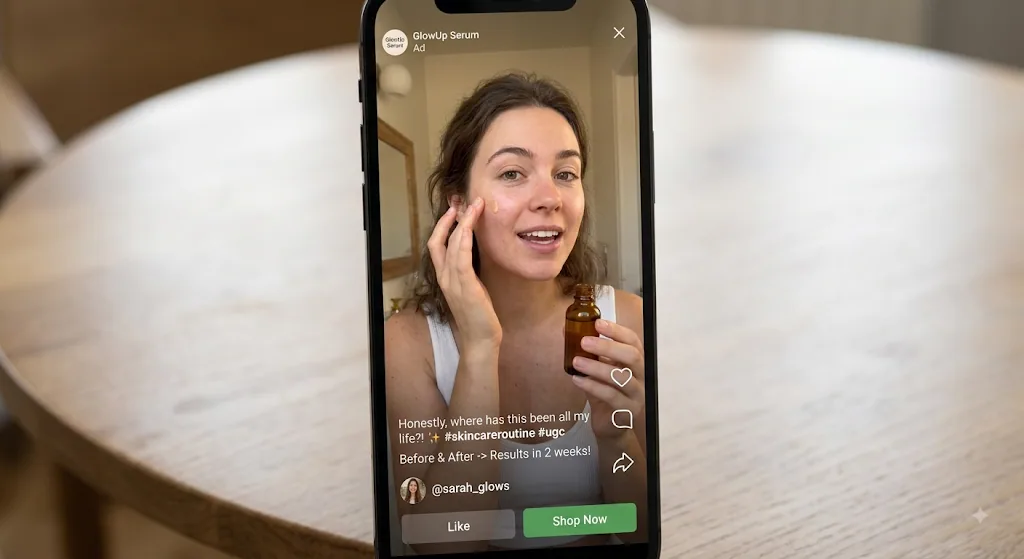
User-generated content videos are one of the highest-performing ad formats in 2026. They earn 4x higher click-through rates and 50% lower cost per click, and audiences trust them far more than polished brand ads. The problem: hiring UGC creators is slow, expensive, and hard to scale. The average creator now charges $150 to $500 per video (DesignRevision, May 2026), and usage rights can double that cost.
A new category of AI video tools now lets brands create UGC-style videos without hiring a single creator. Instead of briefing a freelancer and waiting days, you direct the creative yourself and get a finished video in minutes. This guide walks through exactly how to do it.
What is AI UGC?
AI UGC (AI-generated user-generated content) is video content created using artificial intelligence tools, including AI video generation, AI voiceovers, and AI editing, that mimics the authentic, informal look of creator-made UGC. Instead of hiring a human creator to film and narrate, the entire video is directed, generated, and assembled by AI from a creative brief.
Traditional UGC relies on real people filming with their phones. AI UGC uses the same visual language (vertical framing, conversational tone, casual lighting, direct-to-camera energy) but produces it through AI generation and editing tools. The end result looks like something a creator filmed, but it was directed and assembled in minutes.
This is not about faking authenticity. AI UGC works best for product demos, explainers, brand films, and visual storytelling where the message matters more than the messenger. For genuine customer testimonials where a real human face builds trust, human creators still have the edge.
Market context: The global UGC platform market is valued at $9.85 billion in 2026 and is projected to reach $35.44 billion by 2030 at a 29.2% CAGR (Archive.com, 2026). 87% of brands already use UGC in their marketing, and 76% of consumers consider video the most trustworthy form of UGC. On social platforms, 80% of Gen Z rely on UGC videos for purchase decisions (Kapwing, 2026).
Why brands are switching to AI UGC in 2026
The economics of traditional UGC have shifted. Creator supply has grown 93% year-over-year (Whop, 2026), but rates remain high, especially once usage rights and management overhead are factored in. Meanwhile, AI tools have dropped the cost per video into single digits.
Three forces are driving the switch:
Speed. A five-variation UGC campaign that takes two to three weeks with human creators (briefing, filming, revisions, delivery) can be completed in a single afternoon with AI. When a trend breaks on TikTok, you need creative the same day, not next month.
Cost at scale. One video from a mid-tier creator costs $300 to $1,000. That same budget produces dozens of AI variations. Brands running performance marketing need 20 to 50 creative variants per campaign to beat fatigue. AI makes that volume viable. Organizations report savings of up to 80% on video production costs when switching from traditional to AI-assisted workflows (Sovran, March 2026).
Creative control. With human creators, the brand provides a brief and hopes for the best. With AI creative direction tools, you shape the story, approve the visual direction, and adjust the cut. You are the creative director, not a bystander waiting for a deliverable.
Key finding: A five-variation campaign costs $1,100 to $2,950 with traditional UGC creators versus $100 to $285 with AI UGC tools (VideoTok, 2026). Brands that blend user videos with official brand content see 28% higher engagement than brand-only approaches (Marketing LTB, 2026).
Cost breakdown: hiring creators vs. AI
The headline number ($150 to $500 per video for a human creator versus $2 to $20 for AI) only tells part of the story. The real cost difference becomes dramatic at campaign scale, when you factor in usage rights, revisions, and management time.
UGC Cost Calculator
Drag the slider to compare costs at different monthly volumes.
How to create UGC videos with AI: five steps
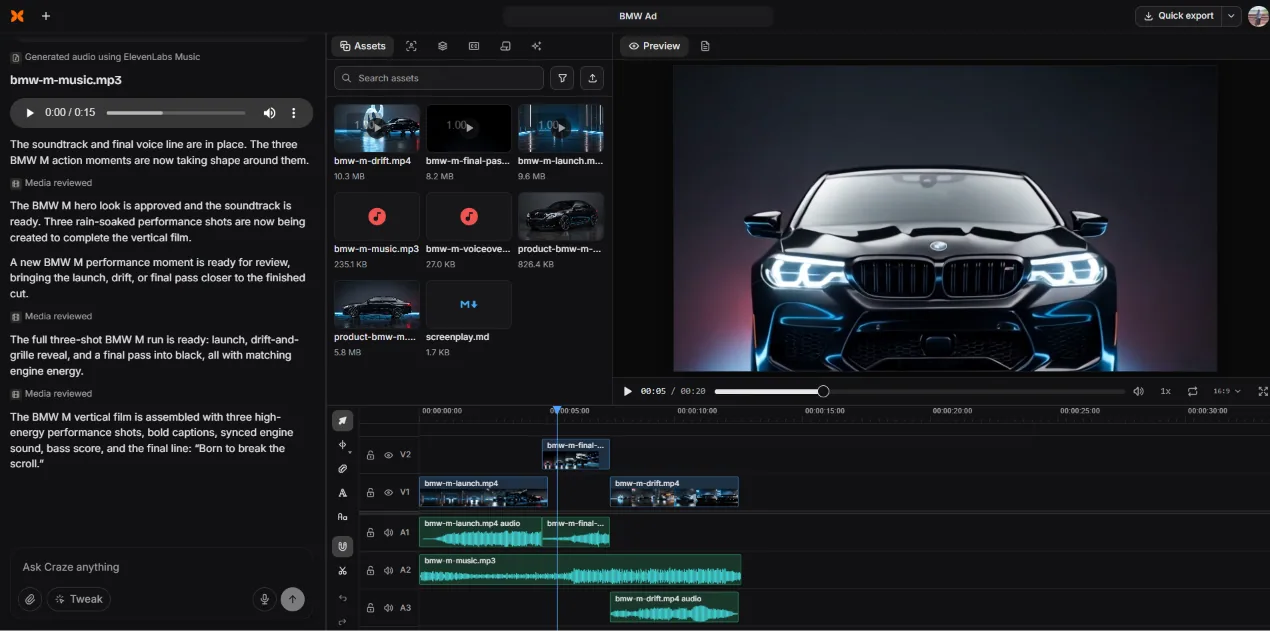
The process below uses Craze, the AI video maker that plans, edits, and turns creative direction into finished videos. Unlike prompt-based generators that output a single clip, Craze collaborates on the entire creative process: story, look, generation, and final cut.
Write a creative brief in plain language
Open a new project in Craze and describe the video you want. Be specific about the product, audience, platform, and tone. For example: "Make a 15-second vertical UGC-style product demo for our new running shoes, targeting fitness-focused women on Instagram Reels, casual and energetic, show the shoe in action." Craze interprets your brief, shapes it into a refined creative direction, and asks clarifying questions with recommended answers, like format (vertical social) and visual style.
Direct the story and visual look
Craze writes a story outline: a mini screenplay with opening shot, action beats, and a closing line. It generates reference images to lock the visual identity, including lighting, color palette, product styling, and atmosphere. You review each choice and approve or revise before anything is produced. This is creative direction, not prompting. You are shaping the film, not typing keywords into a box.
Let AI generate video, audio, and music
Once the story and look are locked, Craze generates all the assets: video clips using models like Kling O3 Pro and Seedance 2.5, voiceovers using ElevenLabs V3, background music using ElevenLabs Music, and product reference images using GPT Image 2. Each asset appears in the project panel for review. You approve, regenerate, or adjust as needed.
Review and refine the assembled cut
Craze assembles everything on a real multi-track timeline: video clips on V1 and V2, audio on A1 through A3, with captions, transitions, and sound design already in place. You watch the preview, then fine-tune. Adjust timing with ripple edits (B), cut clips with the razor tool (C), apply transitions like Cross Dissolve or Directional Blur, add sound effects from the built-in library, and tweak color presets. The full professional editor is there if you need it.
Export and publish
Hit Quick Export in the top right corner. Choose your aspect ratio (9:16 for TikTok and Reels, 16:9 for YouTube) and export. Unlimited exports are included in the $19/month plan. Your video is ready to publish. Need a variant? Go back to step two, change the tone or closing line, and export a new version in minutes.
Speed comparison: This five-step workflow takes 15 to 45 minutes from brief to export. The equivalent process with a human creator (briefing, filming, editing, revisions, delivery) typically takes 5 to 14 business days.
Which UGC formats work best with AI
Not all UGC formats are equal when it comes to AI production. Some are natural fits; others still benefit from a human face. Use the filter below to explore which formats AI handles well and where a hybrid approach works better.
Product demos
Showcase features, angles, and use cases. AI generates cinematic product shots without a studio.
Best for AIBrand films
Short-form brand stories with motion graphics, music, and a polished feel. No crew needed.
Best for AIMotion graphics
Animated explainers, text overlays, and kinetic typography. AI excels at visual-first formats.
Best for AIProduct visualization
3D renders, lifestyle shots, and product-in-context visuals. No photography setup required.
Best for AISocial shorts
TikTok, Reels, and YouTube Shorts with quick cuts, trending music, and scroll-stopping hooks.
Good for AIExplainers and how-tos
Step-by-step guides with voiceover, captions, and visual demonstrations.
Good for AIMusic videos
Stylized visuals and atmospheric footage synced to AI-generated music.
Good for AITestimonials
Customer trust requires real faces. Use AI for editing and production, humans for performance.
HybridUnboxing videos
AI handles product reveals and packaging shots. Add human hands or narration for authenticity.
HybridAI UGC tools compared
The AI video landscape in 2026 splits into three categories: generators that output clips but do not edit, editors that cut footage but do not generate, and end-to-end tools that do both. Here is how the major options stack up for UGC production.
| Feature | Craze | CapCut | Runway | Descript |
|---|---|---|---|---|
| Creative direction | ✓ Builds story first | ✗ | ✗ | ✗ |
| AI video generation | ✓ Kling, Seedance | Limited | ✓ Gen-3/4 | ✗ |
| AI voiceover | ✓ ElevenLabs V3 | ✓ | ✗ | ✓ |
| AI music generation | ✓ ElevenLabs Music | Library only | ✗ | ✗ |
| Timeline editor | ✓ Multi-track NLE | ✓ | ✗ | ✓ Transcript-based |
| Transitions and effects | ✓ Built-in library | ✓ | ✗ | Limited |
| Platform | Browser | Browser + app | Browser | Desktop + browser |
| Pricing | $19/mo flat | Free / $8 to $16/mo | $12 to $96/mo | $24 to $33/mo |
| Best for UGC | End-to-end | Editing only | Generation only | Podcast / talking head |
Craze is the only tool in this comparison that handles the full UGC workflow, from creative planning through AI generation to final cut, in a single workspace. Other tools handle one or two pieces, but you need to stitch together a multi-tool pipeline to match what Craze does natively.
UGC performance by content type
Sources: Kapwing, inBeat Agency, Taggbox, Marketing LTB (2025/2026). Indexed values for comparison.
Common mistakes to avoid
Trying to fake a human creator. AI UGC works best when it leans into visual storytelling: product shots, motion graphics, atmospheric brand films. Rather than trying to imitate a person talking to camera, play to AI's strengths: impossible angles, perfect lighting, and cinematic scale.
Skipping the planning step. Jumping straight into generation produces generic results. The creative direction phase, where you define the story, visual look, and tone before any footage exists, is what separates a polished AI video from a random AI clip. Tools like Craze build this planning step directly into the workflow.
Using one variant and calling it done. The entire point of AI UGC is that you can produce many variants cheaply. Test different hooks, different closing lines, different visual styles. Run five versions, see which one performs, and iterate from the winner. UGC-based ads get 4x higher CTR (Kapwing, 2026), but only when you test enough variants to find the right hook.
Ignoring platform-native formatting. A horizontal 16:9 video dropped into a TikTok feed will underperform regardless of content quality. Always build for the platform first: vertical 9:16 for Reels and TikTok, square 1:1 for feed posts, horizontal only for YouTube. Vertical-form videos see up to 90% higher watch-completion rates (Marketing LTB, 2026).
Over-polishing. UGC works because it does not look like a Super Bowl ad. If your AI-generated video looks too clean, too perfect, too produced, it loses the authenticity that makes UGC effective. Leave some texture. Keep the pacing snappy. Let it feel human. UGC video ads show 35% higher watch-through rates compared to polished brand ads (Taggbox, 2025).
Start making UGC videos with AI
Craze plans, generates, and edits your videos in one workspace.
$19/month flat. No tiers. Unlimited exports.