

How we ranked these tools
Most "best AI video editor" lists rank every tool on the same scale, which makes no sense. A podcast editor and an AI footage generator solve completely different problems. Scoring them on the same rubric produces a list that helps nobody.
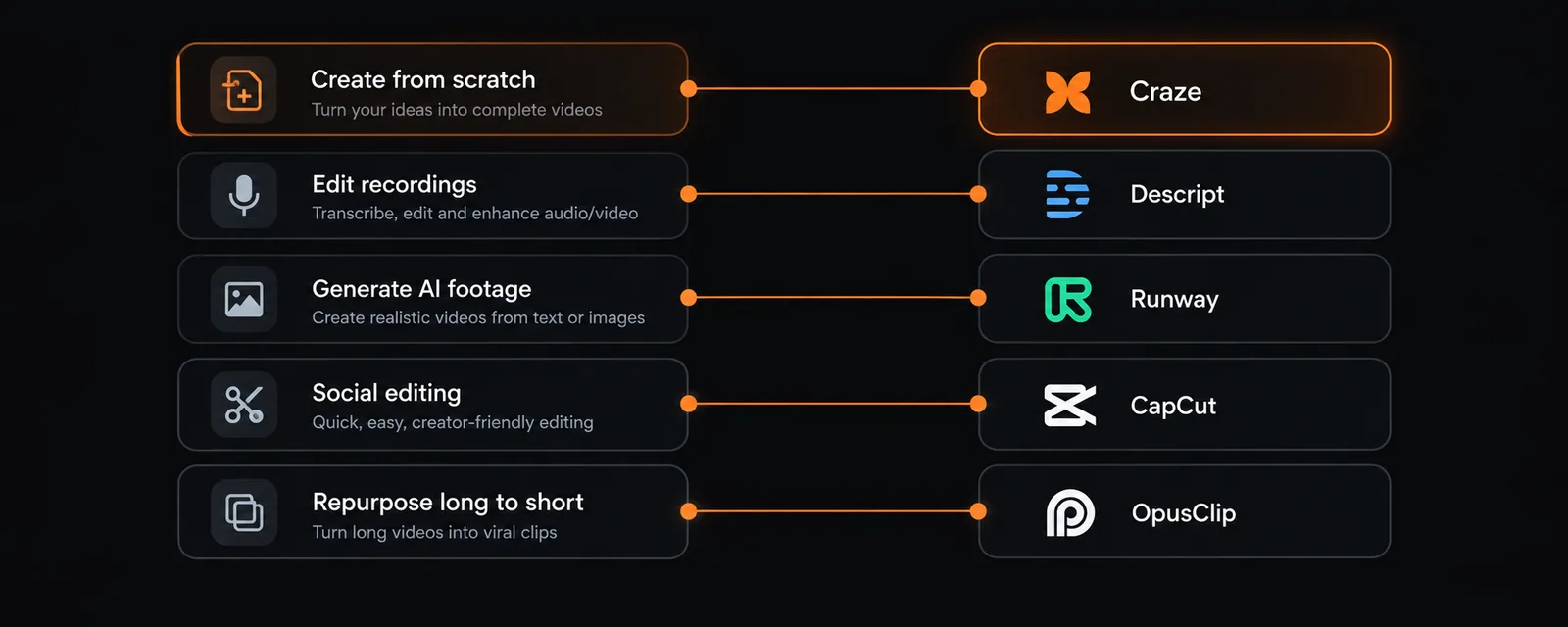
We ranked by workflow instead. There are five distinct workflows in video production, and each one has a clear winner:
- Create from scratch (no footage exists yet, start from an idea)
- Edit existing recordings (you have footage, need to cut and polish it)
- Generate AI footage (you need raw AI clips as material)
- Edit for social platforms (quick social-first editing)
- Repurpose long-form to short-form (clip extraction and reformatting)
The AI video market hit $946 million in 2026, with 78% of marketing teams using AI video in at least one campaign per quarter. 124 million monthly active users across AI video platforms. The tools below are the ones producing real output at production quality.
Quick picks
Best overall (create from scratch): Craze. Plans the creative, generates video/audio/music with AI, edits on a real timeline. $19/month flat.
Best for editing recordings: Descript. Edit video by editing text. Unmatched for podcasts and interviews.
Best free professional editor: DaVinci Resolve. Hollywood-grade color, audio, and VFX. Free, no watermarks.
Best AI footage generator: Runway. Gen-4.5 produces the best creative-controlled AI clips.
Best free social editor: CapCut. Best free tier in the category for TikTok, Reels, and Shorts.
1. Craze: best for creating video from scratch
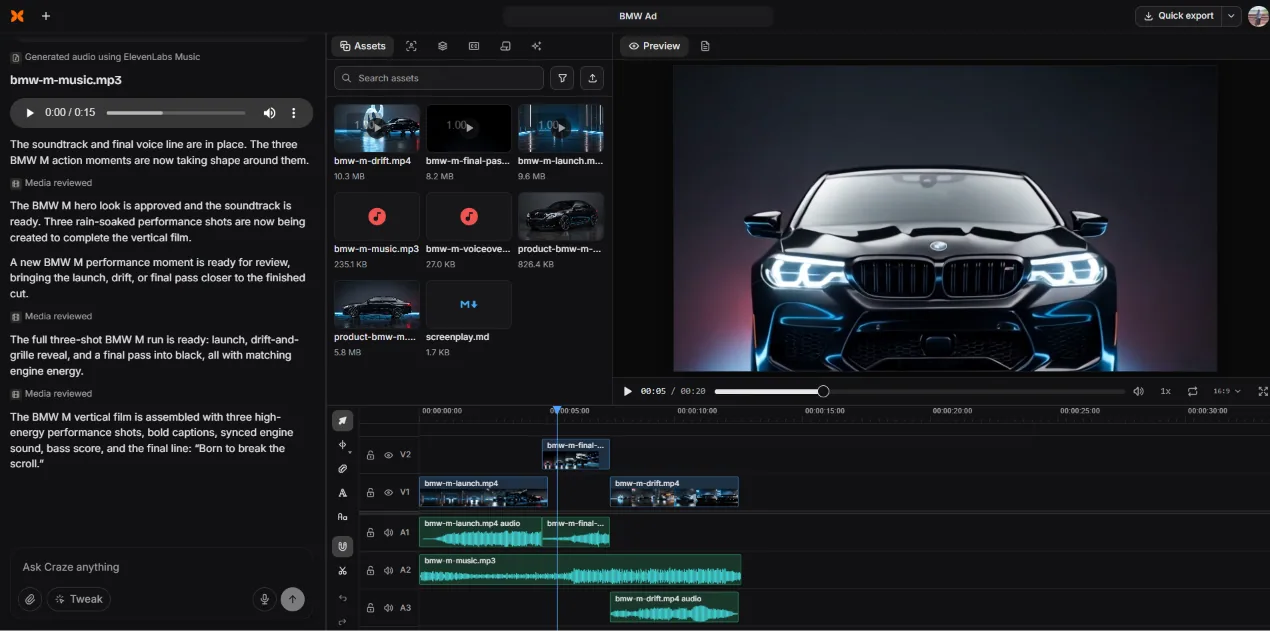
Craze is the AI video maker that plans, edits, and turns creative direction into finished videos. It occupies a category that did not exist two years ago: end-to-end AI video production in one workspace.
You describe what you want in plain language. Craze interprets your brief, asks clarifying questions, writes a story outline, and generates reference images to lock the visual direction. Once approved, it generates video clips (Kling O3 Pro, Seedance 2.5), voiceovers (ElevenLabs V3), music (ElevenLabs Music), and images (GPT Image 2). Everything lands on a multi-track timeline where you refine with transitions, effects, and sound design.
No other tool on this list handles creative planning, multi-model generation, and professional editing in one workspace. That is the distinction.
- Full pipeline: creative planning, generation, editing, export
- Multi-model AI (video, voice, music, images)
- $19/month flat, no tiers, unlimited exports
- Seedance 2.5 + Kling O3 Pro, both unrestricted
- No free plan
- Browser-only
2. Descript: best for editing recordings by transcript
Descript edits video by editing text. Import a recording, get an automatic transcript, cut and rearrange the video by editing the document. Studio Sound cleans audio to near-studio quality. Overdub clones your voice. Filler word removal strips every "um" in two clicks. For podcasters, interviewers, and tutorial creators, nothing else comes close.
Descript does not generate footage. The September 2025 pricing restructure moved to metered media hours and AI credits, which can surprise heavy users. But for its core workflow (spoken content editing), Descript remains the best tool available.
- Transcript-based editing (edit text = edit video)
- Studio Sound, Eye Contact, filler removal
- Strong team collaboration
- Cannot generate video or music
- Metered pricing can exceed sticker price
- Limited visual effects and transitions
3. DaVinci Resolve: best free professional editor
DaVinci Resolve has the most powerful free tier of any video editor, period. Industry-leading color grading (the Hollywood standard), Fairlight audio post-production, Fusion visual effects, and a full multi-track NLE. No watermarks, no time limits, no feature gates on the core tools.
DaVinci Resolve 21, released June 2026, added AI-powered photo editing, neural upscaling, enhanced scene detection, and facial recognition (Digen, 2026). The tradeoff: steep learning curve and GPU-intensive rendering. This is a professional tool, not a quick-edit app.
- Free, no watermarks, no limits
- Industry-leading color grading
- Fairlight audio + Fusion VFX included
- DaVinci Resolve 21 AI tools
- Steep learning curve
- GPU-intensive (needs powerful hardware)
- Desktop-only, no mobile or browser
4. Runway: best for AI footage generation
Runway Gen-4.5 produces the highest-quality AI video clips with the best creative controls. Text-to-video, image-to-video, motion brush, and character locking. For filmmakers and creative teams who need raw AI footage as production material, Runway is the benchmark (Dupple, 2026).
The limitation: Runway generates clips, not finished videos. No creative planning, no timeline editor (beyond basic trim), no voiceover, no music. You take the clip into a separate tool for the final cut. Credit-based pricing ($12 to $96/month) scales fast on large projects.
- Best-in-class AI video generation quality
- Precise camera and motion control
- Character persistence (improving rapidly)
- Generates clips, not finished videos
- No timeline editor or assembly
- Credit-based pricing spikes at volume
5. CapCut: best free social editor
CapCut by ByteDance has the most generous free tier for social video editing: multi-track timeline, keyframe animation, chroma key, speed ramping, auto-captions, and 1080p export. The template library (12M+ assets on Pro) is built for TikTok, Reels, and Shorts. For free social editing, nothing touches it.
The downsides: 2026 pricing restructure doubled Pro costs ($8 to $19.99), features keep moving behind the paywall, ByteDance content licensing terms need review for commercial work, and the tool does not generate footage or plan creative.
- Best free tier in the category
- Massive template and effects library
- True cross-platform (mobile + desktop + browser)
- No AI generation or creative planning
- Paywall creep and 2026 price hike
- ByteDance content licensing concerns
6. Adobe Premiere Pro: best professional NLE with AI
Adobe Premiere Pro is the industry standard with roughly 30 million users. The 2026 updates added AI text-based editing, footage search, Generative Extend (adding frames via Firefly), enhanced speech cleanup, and Object Mask. For broadcast, film, and professional brand work, the Creative Cloud ecosystem (After Effects, Photoshop, Audition) is unmatched.
Premiere is overkill for social clips and has no AI generation capabilities. But when the project demands multi-cam editing, advanced color grading, or broadcast-grade finishing, nothing else has the same depth.
- Industry-standard professional NLE
- AI text-based editing, Generative Extend
- Creative Cloud ecosystem integration
- Steep learning curve, resource-heavy
- Subscription-only (~$23/mo)
- Some AI features still in Beta
7. OpusClip: best for long-form to short-form repurposing
OpusClip takes a long video (podcast, webinar, interview, livestream) and automatically extracts the best short clips for TikTok, Reels, and Shorts. It uses AI to detect viral-worthy moments, auto-reframes for vertical, adds captions, and assigns a "virality score" to each clip.
For teams sitting on hours of long-form content that needs to become short-form, OpusClip is the fastest path. It does not edit in the traditional sense and does not generate footage. It repurposes.
- Automated long-to-short clip extraction
- AI virality score ranking
- Auto-reframe, captions, B-roll insertion
- Not a general-purpose editor
- Auto-reframe imperfect on wide shots
- Limited manual editing controls
8. VEED: best for browser-based captions and quick edits
VEED is a browser-based editor built for speed on simple projects. Auto subtitles, translation into 50+ languages, AI avatars, screen recording. For quick social clips and caption-forward content, VEED gets the job done without installing anything.
G2 reviewers flag slow performance (231 mentions), limited features (226 mentions), and expensive pricing (186 mentions). The free plan hits limits within minutes. Pro costs $29/month per user. For anything beyond basic editing, the limitations compound.
- Browser-based, zero setup
- Auto subtitles and 50+ language translation
- AI avatars and screen recording
- Slow performance on larger projects
- $29/mo Pro is expensive for the feature set
- Free plan very limited
9. Filmora: best for intermediate creators
Wondershare Filmora sits between CapCut and Premiere Pro in complexity. Multi-track timeline, keyframe animation, motion tracking, speed ramping, and a respectable effects library. The 2026 version added AI smart cutout, auto reframe, text-to-video, and integration with frontier models including Sora 2 and Veo for in-timeline generation (Wan3Pro, 2026).
Filmora is the natural upgrade for CapCut users who want more control without the Premiere learning curve. The free version adds a watermark, and some AI features are credit-gated.
- Multi-track with motion tracking and keyframes
- AI smart cutout, auto reframe, text-to-video
- Friendlier than Premiere or Resolve
- Free version adds watermark
- Some AI features credit-gated
- Less professional than Premiere/Resolve
10. Clipchamp: best free option for Windows users
Clipchamp is Microsoft's browser-based editor, built into Windows 11. Trimming, splitting, text overlays, screen recording, auto-captions, and 1080p export, all free. OneDrive and Microsoft 365 integration make it the default for Windows-centric teams.
Clipchamp is lightweight. No keyframe editing, no motion tracking, no advanced AI. It is fine for internal comms, simple tutorials, and quick social clips. For anything more complex, you outgrow it fast.
- Free, 1080p, no watermarks
- Built into Windows 11
- Microsoft 365 integration
- No keyframes, no motion tracking
- Lightweight AI
- Browser-only rendering
The master comparison
| # | Tool | Best for | AI generation | Editor type | Free tier | From |
|---|---|---|---|---|---|---|
| 1 | Craze | Create from scratch | Video, voice, music, images | Direction + NLE | No | $19/mo flat |
| 2 | Descript | Edit recordings | Voice cloning | Transcript-based | 60 min/mo | $16/mo |
| 3 | DaVinci Resolve | Professional editing | AI upscale, detect | Full pro NLE | Full, no limits | Free/$295 |
| 4 | Runway | AI footage generation | Best-in-class clips | Minimal trim | 125 credits | $15/mo |
| 5 | CapCut | Free social editing | Limited (Pro) | Template + timeline | Full basic | Free/$9.99 |
| 6 | Premiere Pro | Professional NLE | Generative Extend | Full pro NLE | Trial only | ~$23/mo |
| 7 | OpusClip | Long to short repurposing | Auto-clip extraction | Repurpose-only | 60 min/mo | $15/mo |
| 8 | VEED | Browser captions | AI avatars | Simple timeline | Very limited | $12/mo |
| 9 | Filmora | Intermediate creators | Text-to-video, cutout | Desktop NLE | Watermark | ~$50/yr |
| 10 | Clipchamp | Free for Windows | None | Basic timeline | 1080p, no WM | Free/$13 |
How to choose the right AI video editor
You need to create video from an idea (no footage): Craze. The only tool that plans, generates, and edits in one workspace.
You have recordings that need editing: Descript for spoken content. DaVinci Resolve for professional grade. CapCut for quick social.
You need raw AI-generated footage: Runway for quality. Kling for value (accessible via Craze).
You need to repurpose long-form into shorts: OpusClip.
Budget is $0: DaVinci Resolve (professional), CapCut (social), or Clipchamp (simple/Windows).
You want the industry-standard pro NLE: Premiere Pro. Now with AI features, still unmatched for broadcast work.
You are making the decision for an agency or team: Craze for multi-client video production ($19/user/month, no per-project fees). DaVinci Resolve or Premiere for in-house post-production.
Start making videos from ideas, not footage
Craze handles creative direction, AI generation, and editing in one workspace.
$19/month flat. No tiers. Unlimited exports.