Why look beyond Descript in 2026?
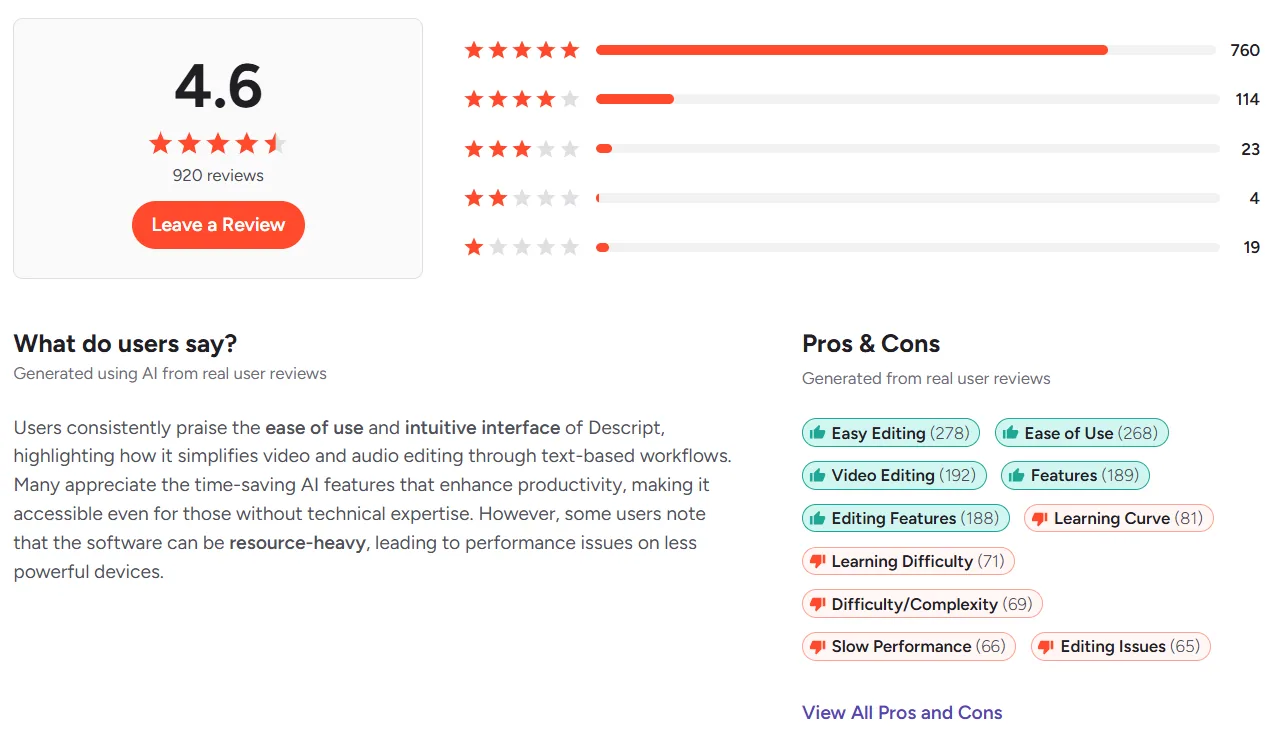
Descript holds a 4.6-star rating on G2 from 800+ reviews, and for its core use case (editing spoken content by editing a transcript) it remains the best tool available. But recent changes and persistent limitations have pushed many creators to look for alternatives.
The biggest shift: Descript restructured its pricing in September 2025, replacing transcription hours with a media-minutes model and adding a separate metered AI credit system. Multi-track sessions can consume 4x or more media minutes than the old counting method. Several G2 and Trustpilot reviewers describe the change as a bait-and-switch, with monthly costs jumping from around $30 into the hundreds once limits hit.
Beyond pricing, the review patterns on G2 flag consistent issues:
- Slow performance appears as a con in 66 of 905 G2 reviews. Large video files cause glitches, crashes, and slowdowns.
- Learning curve is flagged in 81 reviews. Despite the "edit like a document" pitch, the interface has grown complex with features.
- Editing limitations show up in 65 reviews. Transcript-based editing gets awkward for visually driven projects, motion graphics, or anything where you need precise timeline control over visual elements.
- No video generation. Descript does not create footage. It only edits recordings you bring to it. For teams that need to produce video from an idea rather than a recording, this is a fundamental gap.
If you need one answer: Craze is the best overall Descript alternative in 2026 if your bottleneck is creating video, not editing recordings. Craze plans the creative, generates video, voiceover, music, and images using AI, and assembles a final cut on a real timeline. $19/month flat, no tiers, no metered credits.
The best Descript alternatives
Descript is built for one workflow: editing spoken content by editing text. Each of the tools below solves a problem Descript cannot.
1. Descript vs Craze (Best for creating video from scratch)
The gap between Descript and Craze is not about features. It is about what problem each tool solves. Descript edits recordings you already have. Craze creates videos from ideas you have not filmed yet.
In Craze, you describe what you want in plain language. The AI interprets your brief, asks clarifying questions, writes a story outline, and generates reference images to lock the visual direction before producing anything. Once you approve, Craze generates video clips (Kling O3 Pro, Seedance 2.5), voiceovers (ElevenLabs V3), music (ElevenLabs Music), and product images (GPT Image 2). Everything lands on a multi-track timeline where you refine the cut with transitions, effects, and sound design.
For agencies making brand films, teams producing product demos, or creators building AI short films, Craze handles the workflow Descript was never designed for: going from brief to finished video without shooting a single frame.
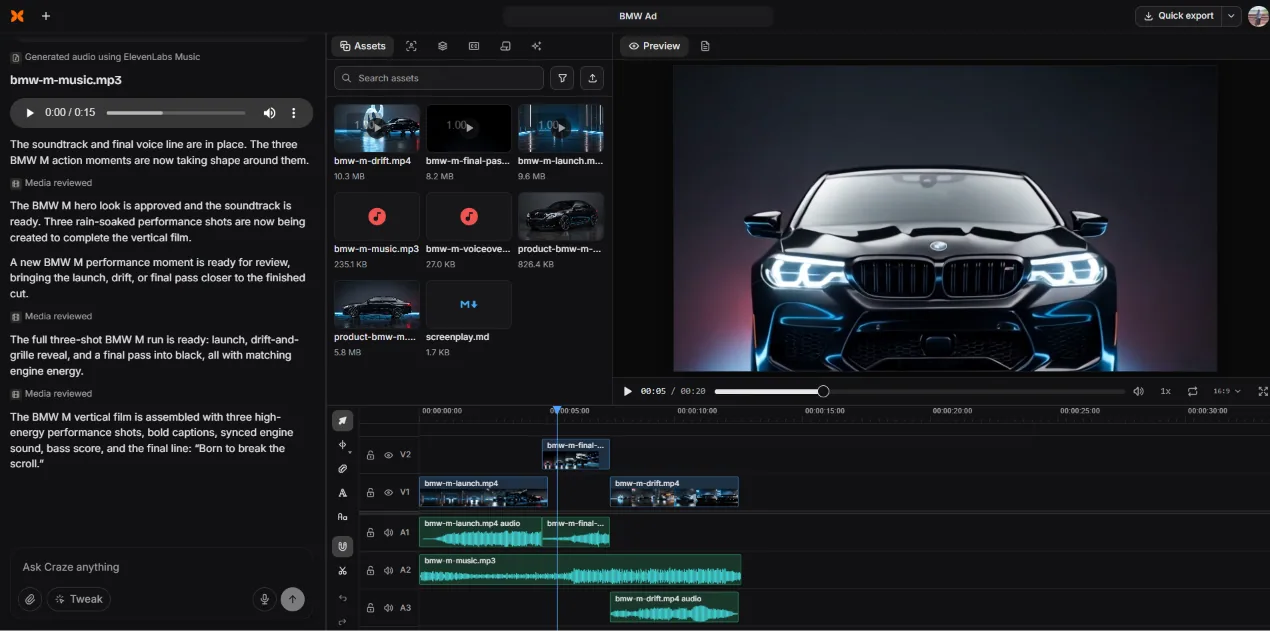
- End-to-end: creative planning, AI generation, timeline editing
- Multi-model generation (video, voiceover, music, images)
- Real multi-track NLE with transitions, effects, sound library
- $19/month flat. No tiers, no credit metering, unlimited exports
- No transcript-based editing (Descript is better for that)
- No free plan
- Browser-only (no desktop or mobile app)
When to pick Craze over Descript: You need to create video from a brief, not edit a recording. Your work involves brand films, ads, product demos, UGC, or any project where footage does not exist yet. You want flat pricing instead of metered credits.
2. Descript vs CapCut (Best free editor for social content)
CapCut by ByteDance is the strongest free Descript alternative for visual editing. Where Descript excels at spoken content, CapCut excels at making footage look good for social platforms, fast.
The free tier includes a real multi-track timeline, keyframe animation, chroma key, speed ramping, auto-captions, and 1080p export. The template library (12M+ royalty-free assets on Pro) is built for TikTok, Reels, and Shorts. CapCut's Auto-Edit takes raw footage and a text description and produces a finished clip with transitions, music, and effects in minutes.
CapCut does not do transcript-based editing, does not generate footage, and its collaboration tools are thin. The 2026 pricing restructure split Pro into Standard ($9.99/mo) and Pro ($19.99/mo), and the content licensing terms under ByteDance deserve review for commercial work.
- Best free tier in the category
- Massive template and effects library
- True cross-platform: mobile + desktop + browser
- Native TikTok integration
- No transcript-based editing
- No AI video generation or creative planning
- Content licensing terms under ByteDance
3. Descript vs Riverside (Best for remote recording quality)
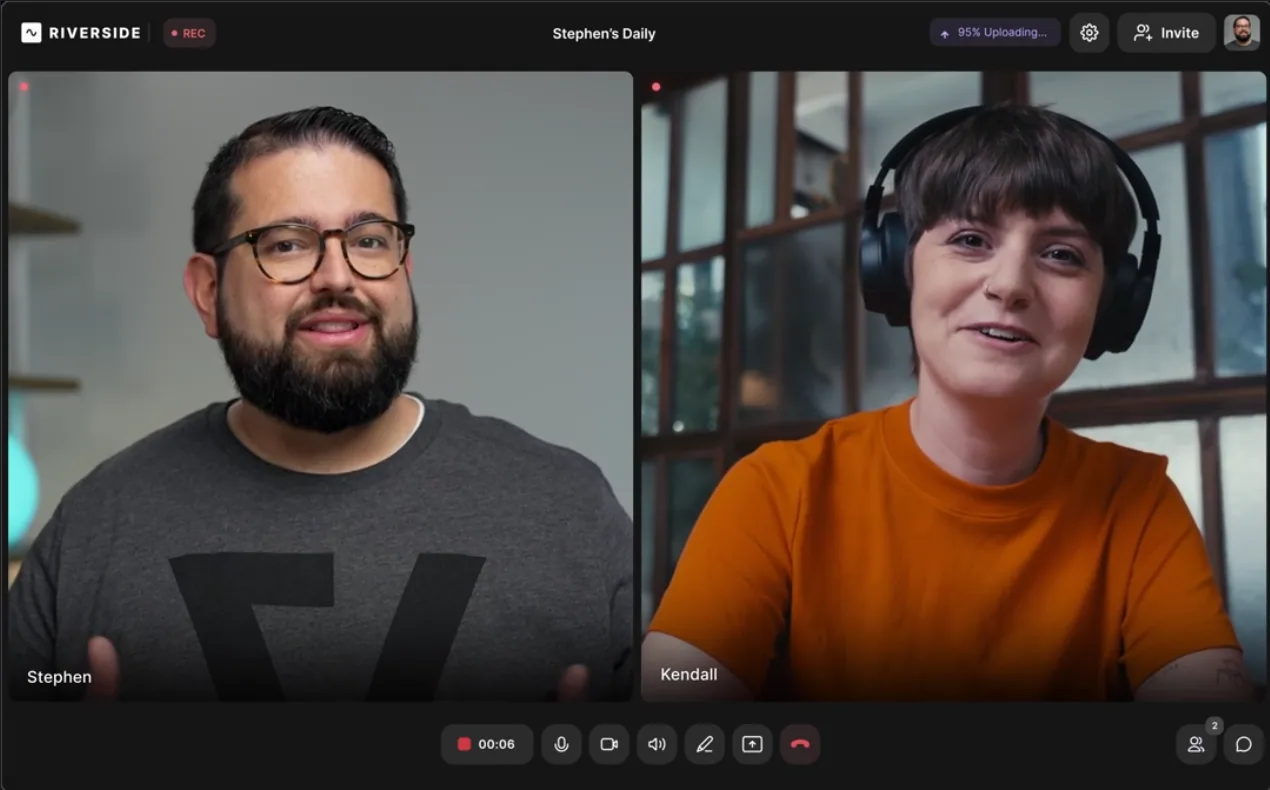
Riverside.fm competes with Descript specifically on recording quality. It records audio and video locally on each participant's device in lossless formats (up to 4K video and 48 kHz audio), which means your recording quality is not affected by internet bandwidth.
Riverside includes automatic transcription with 99% accuracy in 100+ languages, AI-generated show notes, and Magic Clips that identify shareable highlight clips. It supports up to 8 guests and 1,000 audience members for live streaming to YouTube, Facebook, LinkedIn, and Twitch simultaneously.
The editing tools are basic compared to Descript. Riverside records well but does not edit deeply. Most users record in Riverside and export to Descript or another editor for post-production.
- Local recording preserves 4K video and 48 kHz audio quality
- 99% transcription accuracy in 100+ languages
- Magic Clips for auto-highlight extraction
- Live streaming to multiple platforms simultaneously
- Basic native editing (trimming and combining only)
- Advanced editing requires a separate tool
- Browser-dependent (Chrome or Edge required for guests)
4. Descript vs Adobe Premiere Pro (Best for professional post-production)
Adobe Premiere Pro is the industry standard for professional video editing. Its 2026 updates added AI-powered text-based editing (similar to Descript's core feature), AI footage search, Generative Extend (adding frames using Adobe Firefly), and enhanced speech cleanup. Premiere now has about 30 million users globally.
The text-based editing in Premiere is not as fluid as Descript's. But Premiere gives you everything else: advanced color grading (Lumetri), multi-cam editing, motion graphics (via After Effects integration), and broadcast-grade finishing. If you need professional NLE capabilities alongside transcript editing, Premiere is the full package.
The tradeoff: steep learning curve, resource-heavy (requires powerful hardware), and subscription-only pricing through Adobe Creative Cloud.
- Industry-standard professional NLE
- AI text-based editing, footage search, Generative Extend
- Advanced color grading, multi-cam, effects pipeline
- Integration with After Effects, Photoshop, Audition
- Steep learning curve
- Resource-intensive (needs powerful hardware)
- Subscription-only, no free plan
- Some AI features still in Beta
5. Descript vs VEED (Best for quick browser-based editing)
VEED.io is a browser-based video editor built for speed on simple projects. It handles auto subtitles, translation into 50+ languages, AI avatars, and screen recording. For quick social clips and caption-forward content, VEED gets the job done without installing anything.
Compared to Descript, VEED is simpler but also shallower. It lacks transcript-based editing, has limited timeline control, and its AI tools (avatars, voice cloning) are gated behind the $29/month Pro plan. G2 reviewers flag slow performance (231 mentions), limited features (226 mentions), and expensive pricing (186 mentions).
- Fast browser-based editing with zero setup
- Auto subtitles and translation in 50+ languages
- AI avatars and screen recording
- Limited timeline control and editing depth
- No transcript-based editing
- Pro plan at $29/mo is expensive for features offered
- Free plan hits limits within minutes
6. Descript vs Camtasia (Best for screen recording and e-learning)
Camtasia by TechSmith is purpose-built for screen recordings, software tutorials, and e-learning content. It captures screen, microphone, system audio, webcam, and cursor movements at up to 4K/60fps. The multi-track timeline includes interactive elements like quizzes, annotations, and clickable hotspots that make it the go-to for course creators.
Camtasia's AI features include script generation, text-to-speech, AI avatars, filler word removal, and auto-captions. The Rev workflow guides editing through five steps (aspect ratio, layout, background, effects, filters) to streamline output for different platforms.
The limitation: Camtasia only offers yearly billing, the rendering process is resource-heavy, and pricing starts at $179.88/year. It is a desktop application with no browser-based option.
- Best screen recording in the category (4K/60fps)
- Interactive elements: quizzes, annotations, hotspots
- AI script generation, avatars, and audio cleanup
- Strong for e-learning and software tutorials
- Yearly billing only, no monthly option
- Resource-heavy rendering
- Desktop-only (no browser editor)
7. Descript vs Synthesia (Best for AI avatar-based videos)
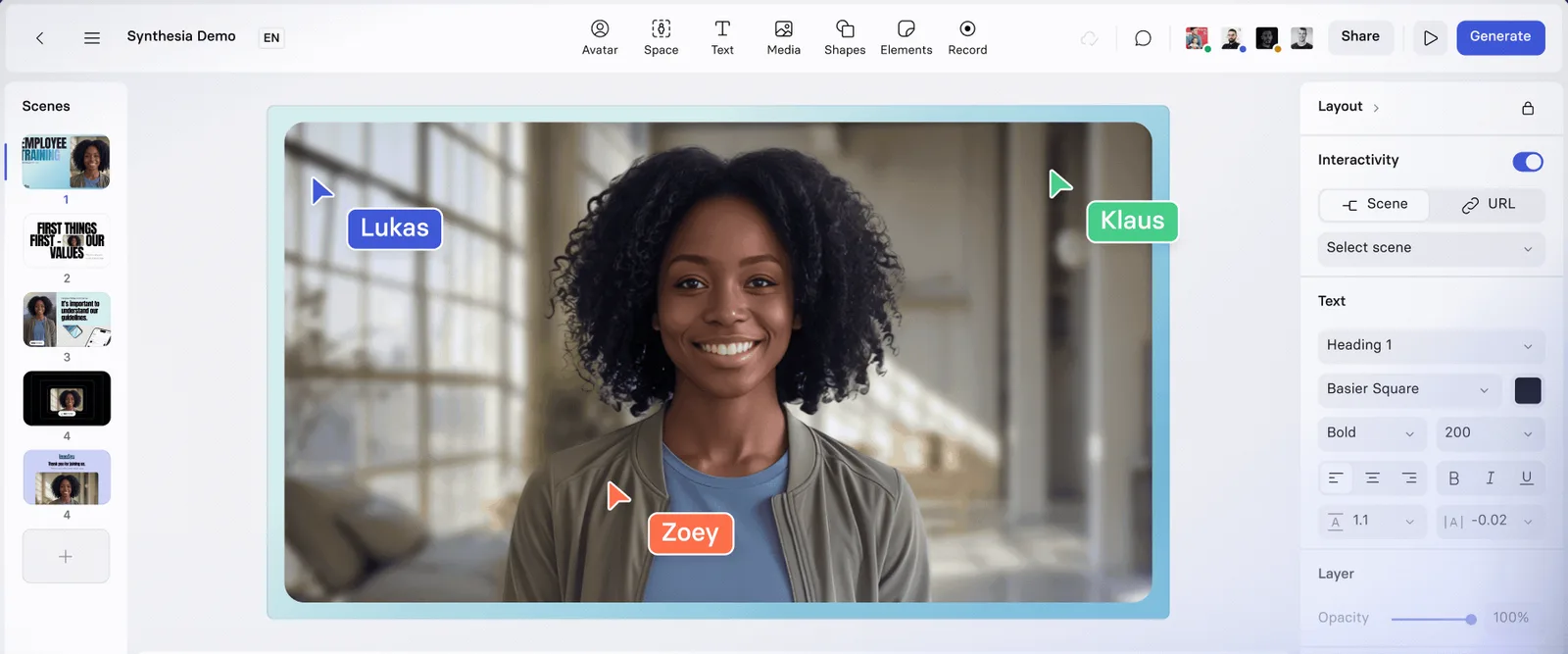
Synthesia is the leading AI avatar video platform, used by Fortune 100 companies for training, onboarding, and internal communications. You write a script, choose from 230+ avatars and 140+ languages, and Synthesia produces a video with a realistic AI presenter, lip-synced to the script.
Synthesia does not edit existing footage. It generates avatar-led videos from text. For enterprise training at scale (especially multilingual), it handles a workflow Descript cannot touch. The SCORM/XAPI export option makes it particularly useful for LMS integration.
- 230+ AI avatars with 140+ language support
- Custom branded avatars for enterprise consistency
- SCORM/XAPI export for LMS integration
- Interactive captions and scene transitions
- Avatar-only: cannot edit real footage
- Avatar expressions can feel flat for upbeat content
- Custom avatars require additional fees
Descript alternatives at a glance
| Tool | Best for | AI generation | Editing model | Starting price |
|---|---|---|---|---|
| Craze | Brand films, ads, product demos | Video, voice, music, images | Creative direction + NLE | $19/mo flat |
| CapCut | TikTok, Reels, Shorts | Limited (Pro only) | Template-driven + timeline | Free / $19.99/mo |
| Riverside | Remote recording quality | Magic Clips only | Basic trim/combine | Free / $15/mo |
| Premiere Pro | Professional post-production | Generative Extend | Full NLE | ~$23/mo |
| VEED | Quick browser-based editing | AI avatars (limited) | Simple timeline | $12/mo |
| Camtasia | Screen recording, e-learning | AI scripts, avatars | Desktop NLE | $179.88/yr |
| Synthesia | AI avatar training videos | Avatar video from script | Scene-based | $18/mo |
*Please check the tool websites for the latest pricing and plans.
How to choose the right Descript alternative
You need to create video from scratch (no recordings): Craze. It is the only tool here that plans the creative, generates all assets, and edits them in a real timeline.
You need a free visual editor for social clips: CapCut. The free tier beats everything else at $0.
You record remote interviews and need studio-quality capture: Riverside. Record there, edit in Descript or another tool.
You need professional-grade post-production: Premiere Pro. It now has text-based editing too, plus everything else a professional NLE offers.
You need quick captions and simple edits in the browser: VEED. Just be aware of the pricing and performance limitations.
You make screen recording tutorials or e-learning: Camtasia. Purpose-built for that workflow with interactive elements.
You need AI avatar videos for training at scale: Synthesia. Best for enterprise training content in multiple languages.
You are happy with Descript for podcasts but frustrated by the pricing: Consider staying with Descript for editing (it is still the best transcript editor) and adding Craze for any video that needs to be created rather than edited.
Need to create video, not just edit recordings?
Craze plans, generates, and edits your videos from a creative brief. $19/month flat. No tiers. No metered credits.