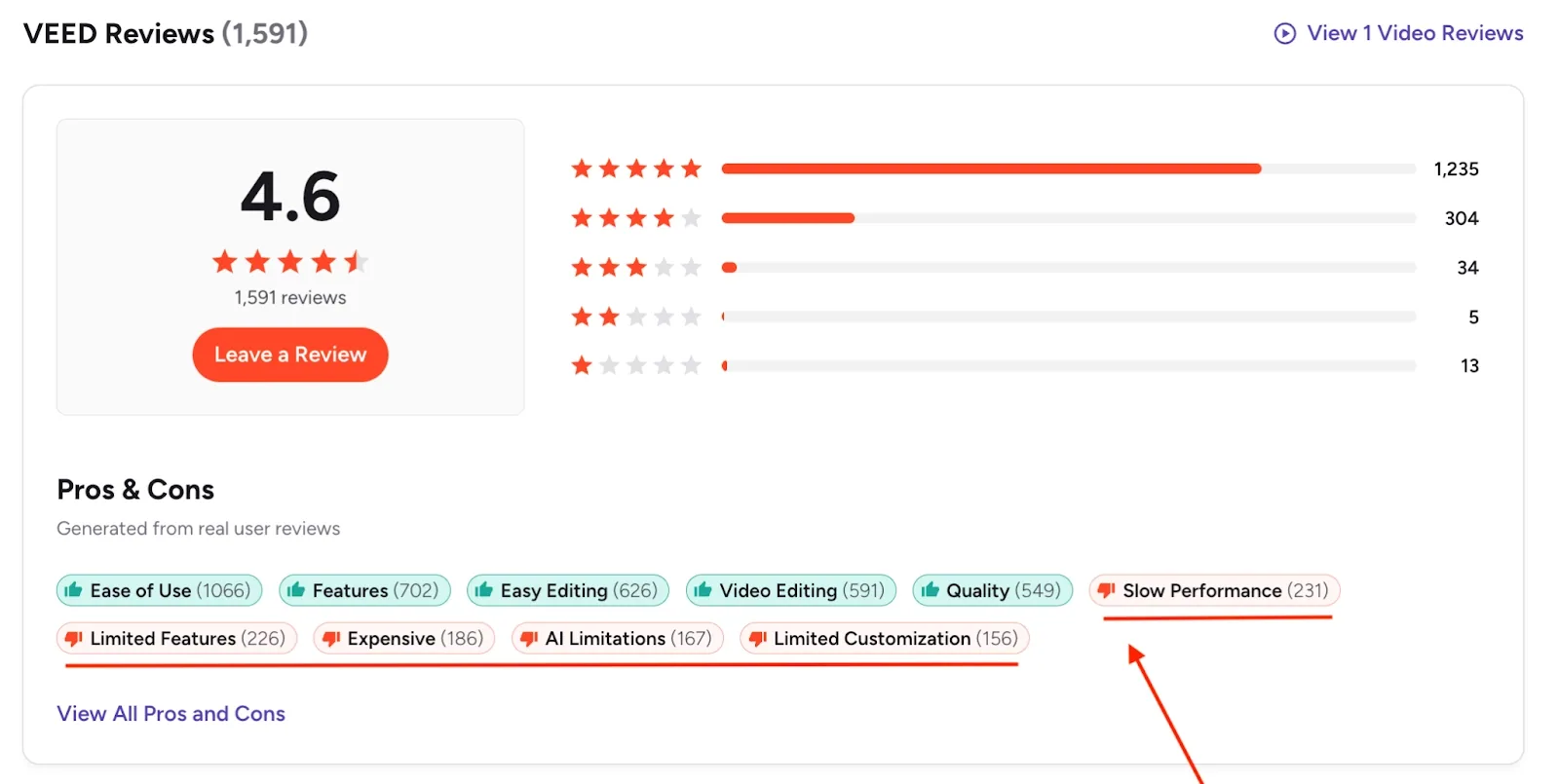
While many creators use VEED for quick social clips, its potential hits a ceiling fast. G2 reviews consistently flag slow performance (231 mentions), limited features (226 mentions), and AI limitations (167 mentions). A recent CNET review hit the free plan's subtitle, translation, TTS, dubbing, and avatar limits within 30 minutes of testing.
That's why more creators and teams are on the lookout for a reliable VEED alternative that can handle more than captions and templates.
In this guide, we've tested eight VEED alternatives on real projects and broken down what each one actually does well, where it falls short, and which one fits your specific workflow.
Let's get to it.
What should you look for in a VEED alternative?
A good VEED alternative should offer:
- AI-powered creative direction or generation to speed up production without needing raw footage, a studio, or on-camera talent
- A real editing timeline with multi-track support, transitions, and effects for professional-grade output
- Flexible export options including 4K, multiple aspect ratios, and no watermarks on paid plans
- Transparent pricing without hidden credit systems or metered limits that spike your monthly bill
- Browser-based editing with smooth performance and no heavy downloads
If you need one answer: Craze is the best overall VEED alternative in 2026 for anyone making brand films, ads, product demos, or UGC. It is the only tool on this list that plans your creative, generates video, audio, and music with AI, and assembles a finished cut on a professional timeline. $19/month, no tiers.
For podcast editing: Descript. For free social editing: CapCut. For raw AI video generation: Runway. For template-based marketing videos: InVideo AI. For non-editors who need something fast: Canva. For blog-to-video: Pictory. For Windows users: Clipchamp.
The best VEED alternatives
If you make videos for marketing, sales, or content (whether brand films, social clips, or team training), these eight VEED alternatives with AI are worth checking out.
1. VEED vs Craze (Best for end-to-end AI video production)
For teams creating brand films, product demos, UGC ads, or any video that starts from an idea rather than recorded footage, Craze offers a major upgrade over VEED. It takes the entire production pipeline off your plate: creative planning, asset generation, editing, and export.
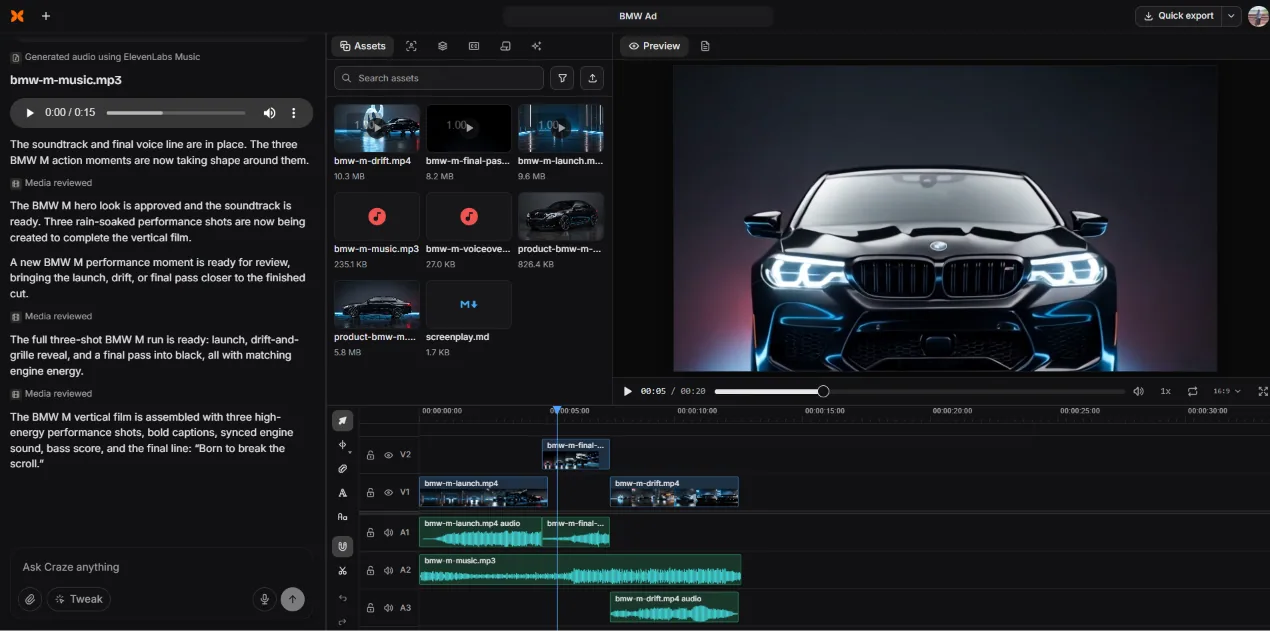
Here's how it works: you describe what you want in plain language. Craze interprets your brief, asks clarifying questions (format, style, tone), then builds a story outline with scene breakdowns and a closing line. It generates reference images to lock the visual direction before producing anything. You approve or revise at every step.
Once the creative is locked, Craze generates all the assets: video clips using Kling O3 Pro and Seedance 2.5, voiceovers using ElevenLabs V3, background music using ElevenLabs Music, and product images using GPT Image 2. Everything lands on a real multi-track timeline (V1/V2 for video, A1/A2/A3 for audio) where you can apply transitions like Cross Dissolve or Directional Blur, add sound effects from the built-in library, and tweak color presets.
The philosophy is "stop prompting, start directing." You are not fighting a template or typing keywords into a prompt box. You are shaping a film through creative back-and-forth, then refining it in a professional editor.
- End-to-end: plans story, generates all assets, assembles final cut
- Multi-model AI generation (video, voiceover, music, images)
- Real multi-track NLE with transitions, effects, sound library
- $19/month flat. No tiers, no credit metering, unlimited exports
- Creative direction workflow (not prompt-based)
- No free plan (VEED and CapCut both have one)
- Browser-only right now (no desktop app)
Craze pricing
Why Craze over VEED: VEED edits clips you already have. Craze creates the clips, the voiceover, the music, and the final cut from a creative brief. If your main frustration with VEED is that you still need to source footage, record audio, and find music separately, Craze eliminates that entire pipeline.
2. VEED vs Descript (Best for podcasts and talking-head video)
Descript is a great VEED alternative for teams editing podcasts, interviews, or tutorial videos. Instead of working with timelines, you simply edit the text. Import a recording, get an automatic transcript, then cut, rearrange, and clean up your video by editing the transcript like a Google Doc. Delete a sentence and the footage cuts with it.
Descript's Studio Sound removes reverb and smooths out speech for studio-quality audio, even if you recorded in a noisy home office. Eye Contact correction makes it look like you are looking at the camera. And the filler word removal strips every "um" and "uh" in two clicks.
What Descript does not do: generate video from scratch. You bring recordings; Descript polishes them. For content that starts from a script rather than a recording, you need a different tool.
Descript restructured its pricing in September 2025, moving to a media-minutes-plus-AI-credits model. The free plan gives 60 media minutes per month. Creator at $24/month (annual) is where most serious users land.
- Transcript-based editing is unmatched for dialogue content
- Studio Sound, Eye Contact, filler removal save hours per episode
- Screen recording and remote recording built in
- Strong collaboration tools for teams
- Cannot generate video, music, or visual assets
- Limited transitions and visual effects
- Metered usage: media hours and AI credits can surprise you
Descript pricing
3. VEED vs CapCut (Best free editor for social content)
CapCut by ByteDance (TikTok's parent company) has the most generous free tier of any video editor: multi-track timeline, chroma key, speed ramping, keyframe animation, auto-captions, and 1080p export, all at $0. The template library (12M+ royalty-free assets on Pro) is the largest in the category.
CapCut quietly restructured pricing in early 2026. The old $8/month Pro was split into Standard ($9.99/month, mainly mobile, no 4K) and a new Pro ($19.99/month, full AI toolkit, 4K, 1TB cloud). Also worth noting: CapCut's terms of service grant ByteDance broad rights over uploaded content, which matters for commercial brand work.
- Best-in-class free tier for social editing
- Massive template and effects library
- Auto-captions, background removal, AI voiceover
- True cross-platform: mobile + desktop + browser
- No AI video generation or creative planning
- 2026 price hike confused many users
- Content licensing terms need careful review for brand work
CapCut pricing
4. VEED vs Runway (Best for raw AI video generation)
Runway is the leading standalone AI video generator. Its Gen-3/Gen-4 models produce some of the highest-quality AI-generated footage available. Text-to-video, image-to-video, and motion brush tools let you create clips that were not possible two years ago.
The distinction matters: Runway generates clips. It does not edit them, does not plan creative, does not assemble a cut, and does not add voiceovers or music. You get a clip, then you take it into a separate editor. For filmmakers experimenting with AI footage, Runway is the benchmark. For anyone who needs a finished video, you will need another tool downstream.
- Best-in-class AI video generation quality
- Text-to-video, image-to-video, motion brush
- Strong creative community and regular model updates
- No timeline editor, no assembly, no voiceover, no music
- Credit-based pricing gets expensive fast ($12 to $96/mo)
- Output is individual clips, not finished videos
Runway pricing
5. VEED vs InVideo AI (Best for template-based marketing videos)
InVideo AI turns text prompts into assembled videos using 16M+ stock assets. Drop in a script, pick a style, and InVideo pulls footage, adds voiceover, and structures the edit. It is fast and works well for social media marketing content and explainers.
The tradeoff: you get speed at the expense of creative control. The AI picks footage that sometimes mismatches the script, and the revision system is credit-based.
- Fast script-to-video pipeline with stock footage
- 5,000+ templates for every social format
- AI voiceovers in multiple languages
- Limited frame-level editing control
- Credit-based revisions add up
- AI footage selection can miss the mark
InVideo AI pricing
6. VEED vs Canva Video (Best for non-editors who need something quick)
Canva's video editor lives inside the same design tool millions already use for presentations, social graphics, and brand kits. If your team is already in Canva, adding video is zero-friction. The editor is simple by design: no multi-track timeline, no advanced audio mixing. It is a design tool that also does video, not a video editor.
- Zero learning curve for existing Canva users
- Excellent brand kit integration
- Huge template library for social and presentations
- Very basic editing: no multi-track, no advanced audio
- Not built for video-first workflows
- No AI video generation
Canva pricing
7. VEED vs Pictory (Best for turning blog posts into video)
Pictory converts scripts, blog URLs, and long-form recordings into short branded videos. Paste a blog URL, and Pictory auto-selects scenes, adds stock footage, generates captions, and produces a draft. Content marketers repurposing written content into video find it useful, though the AI-chosen visuals can feel generic.
- Blog-to-video and script-to-video automation
- AI captions and scene detection
- 29+ language AI voiceovers
- Limited manual editing control
- AI-selected visuals often feel generic
- Shorter max video length per plan
Pictory pricing
8. VEED vs Clipchamp (Best free option for Windows users)
Clipchamp is Microsoft's browser-based editor, now built into Windows 11. It handles trimming, splitting, basic text overlays, screen recording, and auto-captions. For Windows users who need a quick, free editor without installing anything, Clipchamp is the default choice. The tradeoff: no keyframe editing, no motion tracking, no advanced AI.
- Free with 1080p exports, no watermarks
- Built into Windows 11 (zero setup)
- OneDrive and Microsoft 365 integration
- No keyframes, no motion tracking
- Lightweight AI features compared to competitors
- Browser-only with limited rendering control
Clipchamp pricing
Top VEED alternatives at a glance
These are our top choices for VEED alternatives compared.
| Tool | Best for | AI generation | Timeline | Starting price |
|---|---|---|---|---|
| Craze | Brand films, ads, UGC (end-to-end) | Video, voice, music, images | Multi-track NLE | $19/mo flat |
| Descript | Podcasts, interviews, tutorials | Voice cloning only | Transcript-based | Free / $16/mo |
| CapCut | TikTok, Reels, Shorts | Limited (Pro only) | Multi-track | Free / $19.99/mo |
| Runway | AI footage generation (clips) | Best-in-class video gen | None | $12/mo |
| InVideo AI | Template marketing videos | Script-to-video (stock) | Basic | Free / $28/mo |
| Canva Video | Quick edits for design teams | None | Single track | Free / $15/mo |
| Pictory | Blog-to-video repurposing | Script-to-video (stock) | Scene-based | $25/mo |
| Clipchamp | Free basics for Windows | None | Basic timeline | Free / $13/mo |
*Please check the tool websites for the latest pricing and plans.
How to choose the right VEED alternative
The best tool depends on what you are making, not which one has the longest feature list.
You need to create video from an idea with no footage: Craze. It is the only tool here that plans, generates, and edits in one workspace.
You have recordings that need editing: Descript for dialogue-heavy content (podcasts, interviews, courses). CapCut for short social clips.
You need AI-generated footage as raw material: Runway for the highest quality clips. You will still need a separate editor for the final cut.
You need marketing videos fast from templates: InVideo AI or Canva, depending on whether you want AI assembly or manual control.
Budget is $0: CapCut's free tier is the best free video editor available right now. Clipchamp is second if you are on Windows.
You are outgrowing VEED because it is too simple: Craze or Descript, depending on whether your bottleneck is creation (Craze) or editing (Descript).
Ready to make videos that start from direction, not templates?
Craze plans, generates, and edits your videos in one workspace. $19/month, flat. No tiers. Unlimited exports.