Craze
ModelsPricingMCPBlog

Search the docs

Find an article or a question in the Craze docs.

Get started

  • What is Craze?
  • Make your first video
  • A tour of the Craze app
  • Use Craze on your phone
  • Words to know

Work with the Craze agent

  • Describe your video to the Craze agent
  • Answer questions and approve the plan
  • Point at what to change with Tweak
  • Mention files, voices and projects
  • Choose the agent's tier: Efficient, Balanced or Power
  • What the Craze agent can do
  • Go back to an earlier version
  • Write a great brief

Create images, video and sound

  • Make media without the agent
  • Create an image
  • Create a video clip
  • Try a draft first
  • Edit, extend and upscale
  • Remove a background
  • Lip sync and talking photos
  • Motion transfer
  • Voiceovers and voices
  • Music and sound effects
  • Dub a video into another language

Start from a video

  • Start from a template
  • Remake a video
  • Swap people in a video

Edit on the timeline

  • Timeline basics
  • Sequences
  • Trim, split and change speed
  • Captions and transcripts
  • Transitions
  • Effects
  • Animations and keyframes
  • Text and fonts
  • Masks and cutouts
  • Audio
  • Keyboard shortcuts

Your media

  • Upload your files
  • Use the Gallery

Export and share

  • Export a video
  • Share a video with a link

Recipes

  • Make a product ad from product photos
  • Make a UGC-style creator video
  • Turn a talking-head recording into short clips
  • Make a music video cut to the beat

AI models

  • Which AI model should you use in Craze?

Plans and credits

  • Plans and credits

Use Craze from your agent

  • Connect your AI agent to Craze

Account and help

  • Your account and workspace
  • Fix a problem
Browse the docs

Get started

  • What is Craze?
  • Make your first video
  • A tour of the Craze app
  • Use Craze on your phone
  • Words to know

Work with the Craze agent

  • Describe your video to the Craze agent
  • Answer questions and approve the plan
  • Point at what to change with Tweak
  • Mention files, voices and projects
  • Choose the agent's tier: Efficient, Balanced or Power
  • What the Craze agent can do
  • Go back to an earlier version
  • Write a great brief

Create images, video and sound

  • Make media without the agent
  • Create an image
  • Create a video clip
  • Try a draft first
  • Edit, extend and upscale
  • Remove a background
  • Lip sync and talking photos
  • Motion transfer
  • Voiceovers and voices
  • Music and sound effects
  • Dub a video into another language

Start from a video

  • Start from a template
  • Remake a video
  • Swap people in a video

Edit on the timeline

  • Timeline basics
  • Sequences
  • Trim, split and change speed
  • Captions and transcripts
  • Transitions
  • Effects
  • Animations and keyframes
  • Text and fonts
  • Masks and cutouts
  • Audio
  • Keyboard shortcuts

Your media

  • Upload your files
  • Use the Gallery

Export and share

  • Export a video
  • Share a video with a link

Recipes

  • Make a product ad from product photos
  • Make a UGC-style creator video
  • Turn a talking-head recording into short clips
  • Make a music video cut to the beat

AI models

  • Which AI model should you use in Craze?

Plans and credits

  • Plans and credits

Use Craze from your agent

  • Connect your AI agent to Craze

Account and help

  • Your account and workspace
  • Fix a problem
Docs/Get started

What is Craze?

Craze is an AI video platform at craze.ai where you describe a video to the Craze agent and it plans, generates and edits the video for you, with a full timeline editor when you want to change things by hand.

Last updated November 18, 2026

Craze is an AI video platform at craze.ai that takes a video from an idea to a finished file. You tell the Craze agent what you want to make, and it writes the script, plans the shots, generates the video, images, voiceover, music and sound effects, and edits them together on a timeline. When you want to change something yourself, Craze has a full timeline editor with captions, transitions, effects and motion graphics. Everything lives in the cloud, so your projects are there whenever you sign in.

New to Craze? Start with one of these Craze guides:

Make your first video

Describe it to the Craze agent, approve the plan, then export.

Timeline basics

Cut, trim and arrange clips by hand in the Craze editor.

Plans and credits

How Craze plans, credits and top-ups work.
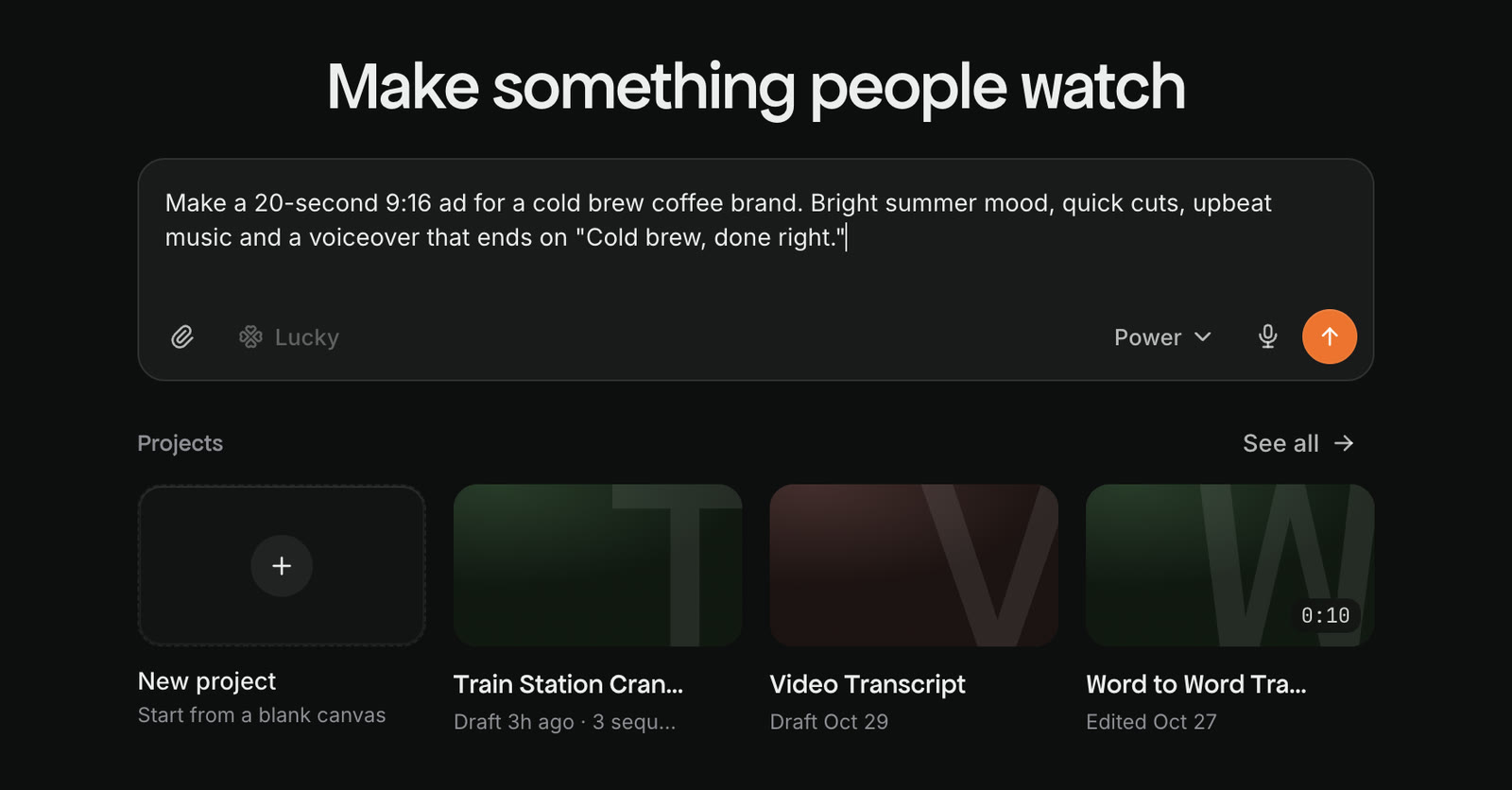
The Craze home page, with the chat box that says Tell Craze what you want to make, a video brief typed in, and recent projects below.
The Craze home page. You describe a video in the chat box and the Craze agent makes it.

What can you make with Craze?

With Craze you can make most short and medium-length videos that brands, creators, agencies and studios publish, for example:

  • Ads and product videos
  • UGC-style videos and social clips for TikTok, Instagram Reels and YouTube Shorts
  • Brand films and explainers
  • Music videos and videos cut to a song's beat
  • Talking-head videos turned into short clips with captions

You can start from nothing, from your own footage and photos, or from one of the example videos on the Craze Templates page.

How do you work in Craze?

Craze gives you four ways to work, and you can mix them in one project:

  • Chat with the Craze agent. Describe your video in the chat on the Craze home page and the agent does the planning, generating and editing.
  • Make media yourself. The Video, Image and Audio tabs at the top of the Craze home page let you pick an AI model and generate a video, image, voiceover, music or sound effect directly, without the agent.
  • Start from an existing video. Remake copies the pacing and style of a reference video using your footage, and Swap puts the characters from your photos into a video.
  • Edit by hand. The Craze editor has a multi-track timeline where you can cut, trim, caption and animate anything the agent made.
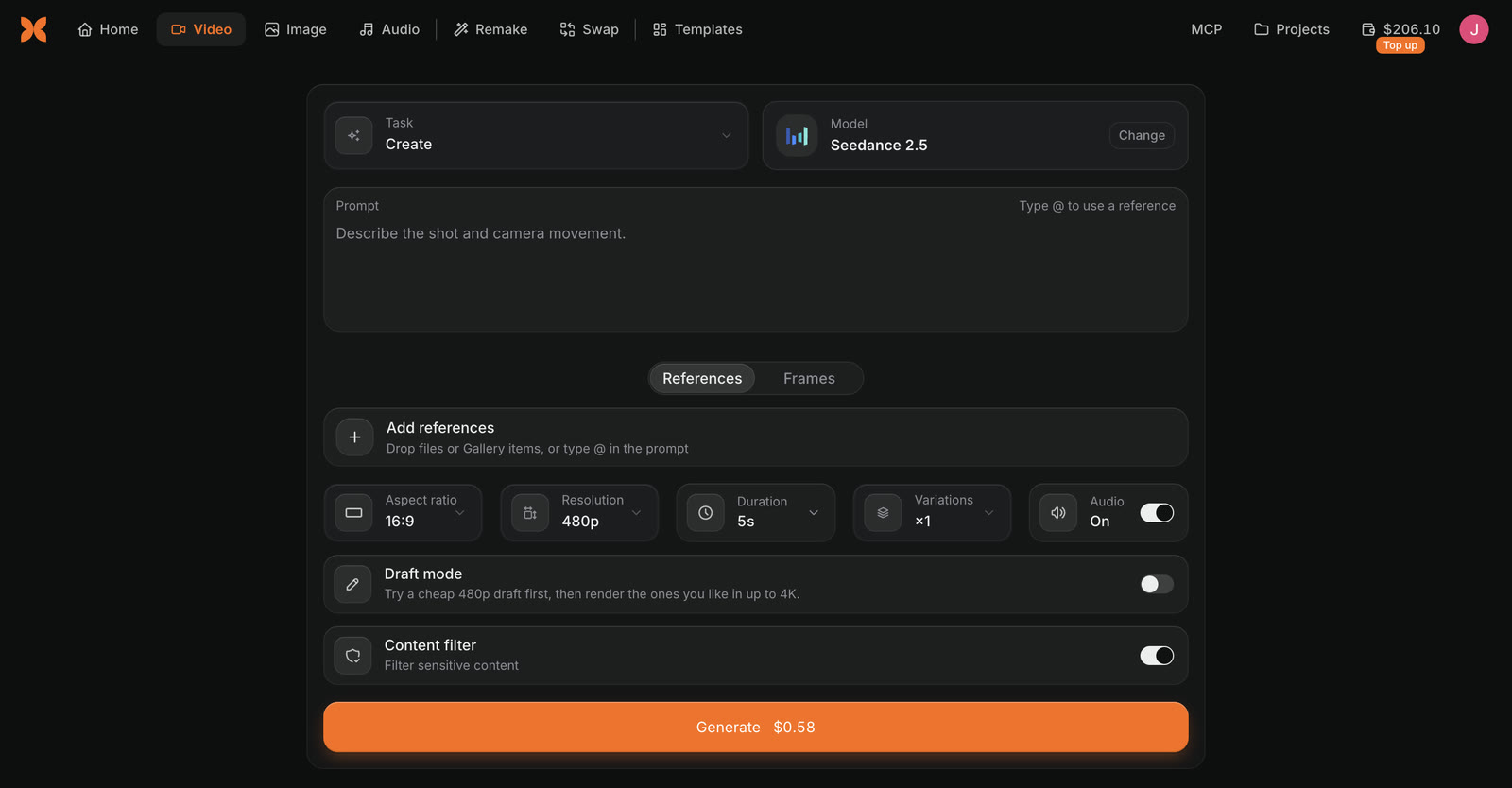
The Video tab in Craze, with the Task, Model, Prompt, References, aspect ratio, resolution, duration and Draft mode settings, and a Generate button that shows the price.
The Video tab in Craze. You pick a model and settings, and the Generate button shows the price before you start.

Which AI models does Craze use?

Craze runs AI models from many makers for video, images, voice, music and sound effects, including Seedance, Kling, Veo, Nano Banana, GPT Image, ElevenLabs and Lyria. Every Craze plan can use every media model. The Craze agent picks a model for each job and tells you the price before it generates, or you can pick a model yourself in the Video, Image or Audio tab. The full list, with what each model is good at and a cost calculator, is on the Craze models page.

How much does Craze cost?

Craze has a Free plan and three paid plans: Pro, Ultra and Max. Each paid plan includes monthly credits, and Craze shows credits in dollars, so you always see what something costs before it runs. You can buy extra credits on any plan, including Free. Current prices and what each plan includes are on the Craze pricing page.

Where can you use Craze?

You use Craze in a web browser at craze.ai, with nothing to install. On a computer, Chrome or Edge gives you the full Craze editor. On a phone, Craze has a simpler layout: you can chat with the Craze agent, generate media, see the Gallery, and preview and export your video, but the timeline editor is only on a computer. Craze is available in English, Japanese, Korean and Spanish.

Can you use Craze from ChatGPT, Claude or Cursor?

Yes. Craze MCP lets you use Craze from your own AI agent, including ChatGPT, Claude, Cursor and Claude Code. Your agent can create projects, upload files, generate media and export videos in your Craze account. Setup steps for each app are on the Craze MCP page.

Questions people ask

Yes. Craze has a Free plan with limited usage, and paid plans (Pro, Ultra and Max) that include monthly credits. Current prices are on craze.ai/pricing.

No. In Craze you can describe the video you want in plain words and the Craze agent plans, generates and edits it. The timeline editor is there if you want to change details yourself.

Yes. Craze works in a phone browser with a simpler layout: you can chat with the Craze agent, generate media, see the Gallery and preview and export your video. The timeline editor needs a computer.

NextMake your first video
Table of contents
  • What can you make with Craze?
  • How do you work in Craze?
  • Which AI models does Craze use?
  • How much does Craze cost?
  • Where can you use Craze?
  • Can you use Craze from ChatGPT, Claude or Cursor?
  • Direct
  • Create
  • Edit
  • Models
  • Pricing
  • MCP
  • Contact us
  • Docs
  • Blogs
  • Changelog
  • Privacy
  • Terms
  • Instagram
  • YouTube
  • X
  • LinkedIn
  • English
  • 日本語
  • 한국어
  • Español
  • Deutsch
  • Français
  • Português
  • 简体中文

© 2026 Craze Technologies