
What is a mention in Craze?
A mention in Craze is a label in your chat message that points the Craze agent at one exact file, voice or project. You add one by typing @ in the Craze chat box and picking from the list. A mention removes any doubt: "use @logo-white.png at the end" tells the Craze agent which logo to use, even when a project has several.
How do you mention something in the Craze chat?
You mention something in the Craze chat by typing @ in the chat box.
- Type
@in the Craze chat box. A list opens. - Keep typing to search the list by name.
- Click an item, or move to it with the arrow keys and press
Enter. - The mention appears as a label at that spot in your sentence. Carry on typing and send the message.
Items you already mentioned in the message are marked Added in the list.
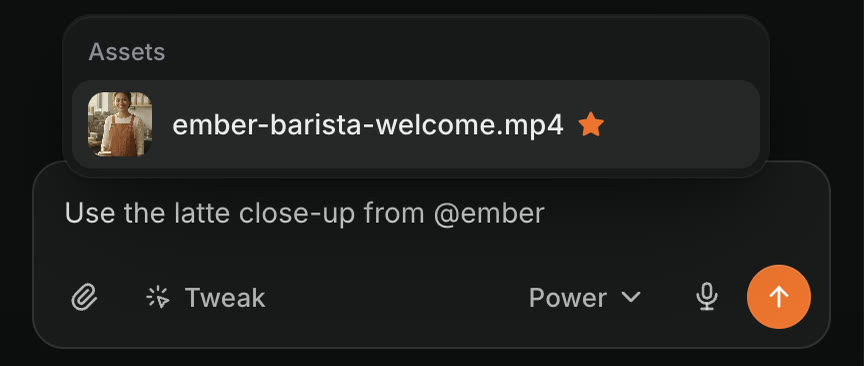
What can you mention in Craze?
The Craze mention list groups what you can mention under these headings:
| Heading in the list | What you can mention in Craze |
|---|---|
| Attached to this message | Files you just attached to the message you're writing |
| Voices | The custom voices saved in your workspace |
| Assets | Files already in the project: your uploads and everything Craze generated |
| Projects | Your other Craze projects, including archived ones |
Mentions also work in the comment box of a Craze tweak.
How do you use a custom voice with a mention in Craze?
You use a custom voice in Craze by mentioning it in the chat, for example "narrate the script with @Warm Narrator". The Voices group in the Craze mention list shows every custom voice saved in your workspace, so everyone in the workspace can use the same voice in any project. A Craze workspace keeps up to 3 custom voices. You can ask the Craze agent to design a new custom voice from a description.
How do you mention another project in Craze?
You mention another Craze project by typing @ in the chat box and picking it under Projects. The Craze agent can then look inside that project and copy footage, images, fonts, logos and audio into the project you're working in, for example: "Copy the logo and music from @Spring launch into this video." The Craze agent can look at another project freely, and asks you before it changes anything in one.
In a sent message, a project mention opens that project in a new tab when you click it. If the project was deleted later, the label says Deleted project.
How do you remove a mention in the Craze chat box?
You remove a mention in the Craze chat box by pressing Backspace once right after it. The whole label goes in one press, not one letter at a time, and undo (⌘Z, or Ctrl+Z on Windows) brings it back.
Do you have to use mentions with the Craze agent?
No. Mentions are optional in Craze. The Craze agent can find a file or project from a plain description such as "the drone shot I uploaded yesterday" or "my launch video project from last week". Use a mention when names are similar or a project has many files, so there is no guessing.