
How do you undo a change in Craze?
You undo a change in Craze with the undo button in the top row of the timeline, or by pressing ⌘Z (Ctrl+Z on Windows). Redo is the button next to it, or ⌘⇧Z (Ctrl+Shift+Z on Windows). Craze undo covers every change to the project, whether you made it on the timeline or the Craze agent made it from the chat.
Where is History and checkpoints in Craze?
History and checkpoints is in the More menu in the top row of the Craze timeline, on a computer. It opens a window that says "Step back through recent edits, or return to a saved version." with two tabs:
- Recent changes lists the latest edits, newest first, with Undo and Redo buttons.
- Checkpoints lets you save the current version under a name and restore saved ones.
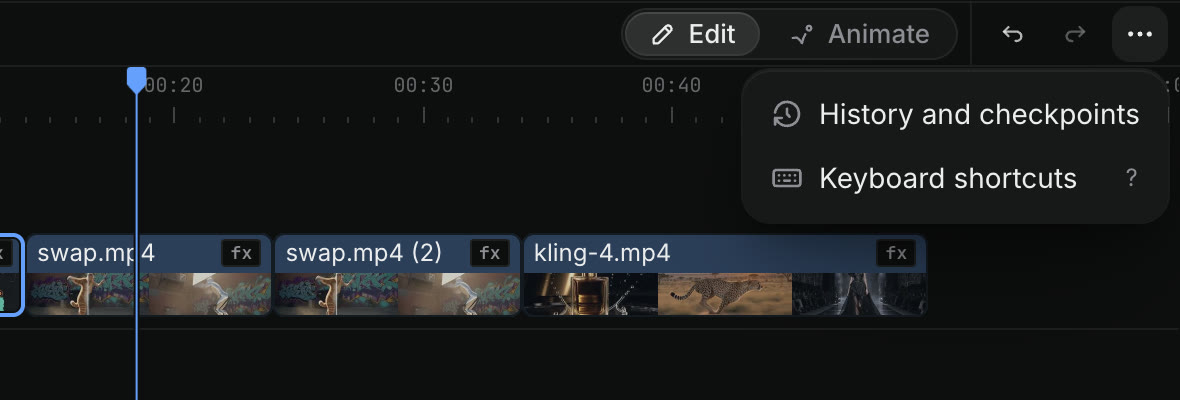
How do you see who changed what in Craze?
The Recent changes tab of History and checkpoints in Craze lists each edit with who made it and its revision number, such as "You · Revision 12" or "Agent · Revision 13". An edit the Craze agent made from another project's chat names that chat. Changes you have undone are marked Undone, and the change that Undo would reverse next is marked Next undo.
How do you save a checkpoint in Craze?
You save a checkpoint in Craze from the Checkpoints tab of History and checkpoints.
- Click More in the top row of the Craze timeline and choose History and checkpoints.
- Open the Checkpoints tab.
- Type a name in Checkpoint name, such as "Good cut v1".
- Click Save checkpoint.
Named checkpoints are kept for good. Craze also saves automatic checkpoints, listed under Auto saves, but those rotate out over time. Save a named checkpoint before a big change you might want to undo, such as a new intro or a different music track.
How do you restore a checkpoint in Craze?
You restore a Craze checkpoint from the Checkpoints tab of History and checkpoints.
- Click More in the top row of the Craze timeline and choose History and checkpoints.
- Open the Checkpoints tab and find the version under Saved or Auto saves.
- Click Restore next to it.
- Click Restore again to confirm.
The timeline goes back to that version. Media stays in your Assets, and you can undo the restore.
How do you ask the Craze agent to go back to an earlier version?
You can ask the Craze agent to go back to an earlier version in the chat, in plain words. For example:
- "Show me the earlier versions of this video."
- "Go back to the version from before the new intro."
- "Restore my checkpoint called Good cut v1."
The Craze agent lists the versions Craze has kept and restores the one you choose. Craze keeps the newer versions after a restore, and one undo reverses it. Asking the Craze agent is the way to restore a version from a phone, where the timeline isn't available.
Does going back in Craze delete generated media?
No. Going back to an earlier version in Craze changes only the edit on the timeline. Every video, image and audio file you uploaded or generated stays in Assets and the Gallery, so you can put a clip from a newer version back into the restored one, or ask the Craze agent to do it.