
Do you need to choose a model in Craze?
No. The Craze agent chooses an AI model for every shot, image, voice and sound it makes, based on what you asked for. Before it generates, the Craze agent shows its plan with the model and price for each piece, and often asks you to choose between a few models, each with its price next to it. Your answer is the go-ahead.
If you already know which model you want, name it in the chat, for example "use Veo 3.1 for the opening shot". The Craze agent uses the model you name. The Craze models directory lists every model with its specs and prices.
Which Craze model is best for video?
The Craze video model to pick depends on the length, resolution and inputs you need. This table matches common video goals to Craze models:
| Your goal | Good models in Craze |
|---|---|
| A multi-shot clip up to 30 seconds with sound, in one generation | Seedance 2.5, Kling 4 |
| A sharp 4K clip | Veo 3.1, Kling 3 4K, Gemini Omni Flash |
| Mixing text, images, video and audio references in one prompt | MiniMax H3 |
| Keeping a character consistent with realistic physics | Gemini Omni Flash |
| Long single clips up to 30 seconds | Wan 3.0 |
| Quick, low-cost drafts to try ideas | Seedance 2.0 Fast, Kling 4.0 Flash, Veo 3.1 Lite |
| Extending a clip you already have | Grok Imagine, Vidu Q2 Pro |
| Swapping the people in a video while keeping the performance | MiniMax H3 Max Recast |
Which Craze model is best for images?
Craze image models differ in resolution, text rendering and editing control. This table matches common image goals to Craze models:
| Your goal | Good models in Craze |
|---|---|
| Everyday images and quick edits | Nano Banana 2.1, Nano Banana 2 |
| High resolution up to 4K for print or large screens | Nano Banana Pro, Seedream 5 Lite |
| Fine detail and exact edits | GPT Image 2.6 Sunburst |
| Character sheets and product mockups | GPT Image 2.6 Flare |
| Readable text, signs and typography | Ideogram 4, Ideogram 4.5 |
| Edits built from several reference photos | Seedream 5 Pro |
| Design-led, artistic images | Recraft V4.1 Pro |
| Photorealistic images | FLUX.2 Pro, FLUX.2 Realism |
| Fast, low-cost ideas | Z-Image Turbo |
Which Craze model is best for voiceover?
Craze voice models turn a script into narration, create new voices and change or translate recorded speech. This table matches common voice goals to Craze models:
| Your goal | Good models in Craze |
|---|---|
| Narration from a script, in 90+ languages | ElevenLabs v4, the default Craze narrator |
| Fast, low-cost scratch reads | ElevenLabs v4 Turbo, Gemini 3.8 Flash Lite TTS |
| Describing the voice in plain words | Gemini 3.8 Flash TTS |
| Designing a brand-new voice | ElevenLabs Voice Design V3, MiniMax Voice Design |
| A reusable voice from one recording | Kling Voice Clone |
| Turning a recording into a different voice | ElevenLabs Voice Changer |
| Dubbing a video into another language | ElevenLabs Dubbing |
Which Craze model is best for music and sound effects?
Craze makes royalty-free music and sound effects from a description. This table matches common audio goals to Craze models:
| Your goal | Good models in Craze |
|---|---|
| A complete song up to 3 minutes, with verse and chorus | Lyria 3 Pro |
| Background music and ambient scores | ElevenLabs Music, ElevenLabs Music v2.5 |
| A sound effect from a text description | ElevenLabs Sound Effects V2 |
| Sound effects matched to the movement in a video | Hunyuan Video Foley |
Which Craze model is best for talking avatars and lip sync?
Craze avatar models make a photo or character speak, and lip sync models match existing footage to new audio. This table matches common goals to Craze models:
| Your goal | Good models in Craze |
|---|---|
| A talking photo from a portrait and a voice track | HeyGen Avatar 6, Kling Avatar 2 Pro |
| A full-body performance on audio up to five minutes | OmniHuman 2, VEED Fabric 1.0 |
| An animated or illustrated character that speaks in its own style | HeyGen Avatar 6 Character |
| Copying the movement in a video onto a still image | DreamActor 2 |
| Syncing the lips in a video to new audio | Sync Lipsync 3, Sync Lipsync 2 Pro, Kling LipSync |
Which Craze models fix or clean up images?
Craze has utility models for upscaling images, removing backgrounds and making small changes. This table matches common clean-up jobs to Craze models:
| Your goal | Good models in Craze |
|---|---|
| Making an image sharper and larger | Topaz Upscale, SeedVR2 Upscale |
| Removing a background, keeping hair and fur | BiRefNet, Bria RMBG 2.0 |
| Changing one part of an image, such as its text | FLUX Kontext |
How do you pick a model yourself in Craze?
To pick a Craze model without the agent, use Make:
- On the Craze home page, open the Video, Image or Audio tab. Inside a project, click Make at the top of the chat.
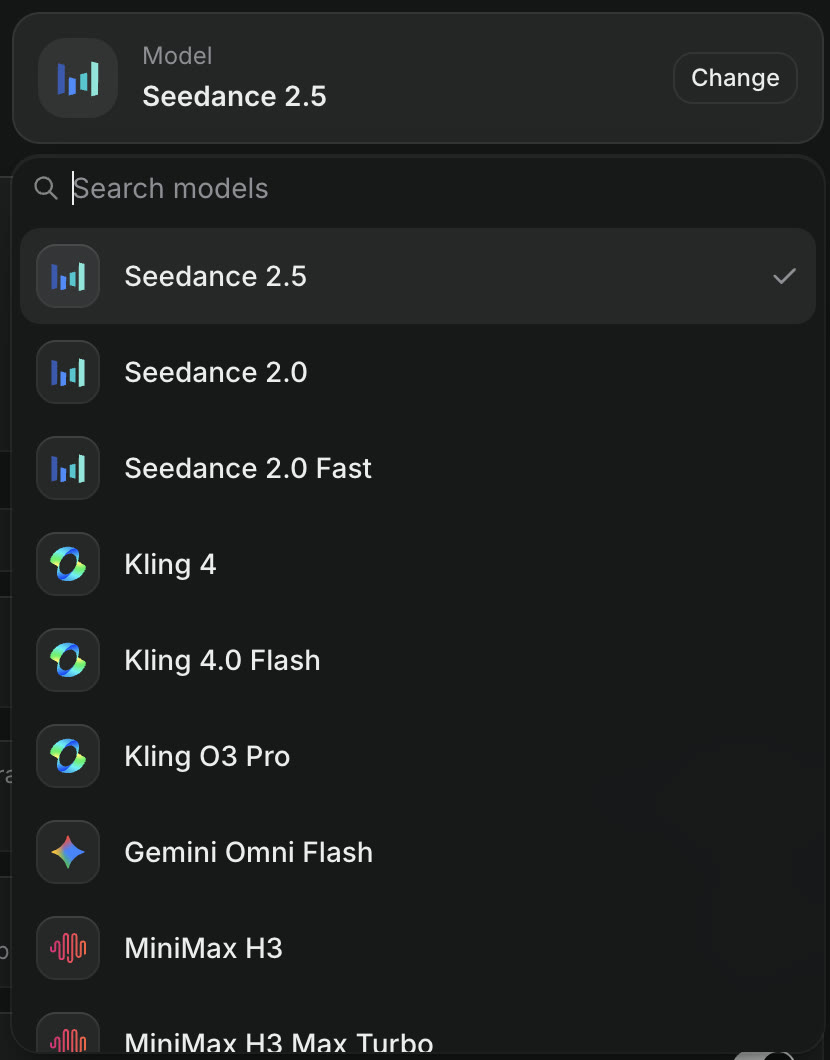
- Choose a task, then click Change next to the model name and pick a model.
- Write your prompt and set the options, such as aspect ratio, resolution and duration.
- Click Generate. The Generate button shows the price before you start.
Every Craze plan, including Free, can use every image, video and audio model. Prices for each model are in the Craze models directory.