Craze
ModelsPricingMCPBlog

Search the docs

Find an article or a question in the Craze docs.

Get started

  • What is Craze?
  • Make your first video
  • A tour of the Craze app
  • Use Craze on your phone
  • Words to know

Work with the Craze agent

  • Describe your video to the Craze agent
  • Answer questions and approve the plan
  • Point at what to change with Tweak
  • Mention files, voices and projects
  • Choose the agent's tier: Efficient, Balanced or Power
  • What the Craze agent can do
  • Go back to an earlier version
  • Write a great brief

Create images, video and sound

  • Make media without the agent
  • Create an image
  • Create a video clip
  • Try a draft first
  • Edit, extend and upscale
  • Remove a background
  • Lip sync and talking photos
  • Motion transfer
  • Voiceovers and voices
  • Music and sound effects
  • Dub a video into another language

Start from a video

  • Start from a template
  • Remake a video
  • Swap people in a video

Edit on the timeline

  • Timeline basics
  • Sequences
  • Trim, split and change speed
  • Captions and transcripts
  • Transitions
  • Effects
  • Animations and keyframes
  • Text and fonts
  • Masks and cutouts
  • Audio
  • Keyboard shortcuts

Your media

  • Upload your files
  • Use the Gallery

Export and share

  • Export a video
  • Share a video with a link

Recipes

  • Make a product ad from product photos
  • Make a UGC-style creator video
  • Turn a talking-head recording into short clips
  • Make a music video cut to the beat

AI models

  • Which AI model should you use in Craze?

Plans and credits

  • Plans and credits

Use Craze from your agent

  • Connect your AI agent to Craze

Account and help

  • Your account and workspace
  • Fix a problem
Browse the docs

Get started

  • What is Craze?
  • Make your first video
  • A tour of the Craze app
  • Use Craze on your phone
  • Words to know

Work with the Craze agent

  • Describe your video to the Craze agent
  • Answer questions and approve the plan
  • Point at what to change with Tweak
  • Mention files, voices and projects
  • Choose the agent's tier: Efficient, Balanced or Power
  • What the Craze agent can do
  • Go back to an earlier version
  • Write a great brief

Create images, video and sound

  • Make media without the agent
  • Create an image
  • Create a video clip
  • Try a draft first
  • Edit, extend and upscale
  • Remove a background
  • Lip sync and talking photos
  • Motion transfer
  • Voiceovers and voices
  • Music and sound effects
  • Dub a video into another language

Start from a video

  • Start from a template
  • Remake a video
  • Swap people in a video

Edit on the timeline

  • Timeline basics
  • Sequences
  • Trim, split and change speed
  • Captions and transcripts
  • Transitions
  • Effects
  • Animations and keyframes
  • Text and fonts
  • Masks and cutouts
  • Audio
  • Keyboard shortcuts

Your media

  • Upload your files
  • Use the Gallery

Export and share

  • Export a video
  • Share a video with a link

Recipes

  • Make a product ad from product photos
  • Make a UGC-style creator video
  • Turn a talking-head recording into short clips
  • Make a music video cut to the beat

AI models

  • Which AI model should you use in Craze?

Plans and credits

  • Plans and credits

Use Craze from your agent

  • Connect your AI agent to Craze

Account and help

  • Your account and workspace
  • Fix a problem
Docs/Work with the Craze agent

Answer questions and approve the plan

The Craze agent asks a few questions in a card above the Craze chat box, then shows a plan (a shot list in the chat or a plan page) and only generates video once you approve it.

Last updated November 18, 2026

Why does the Craze agent ask questions?

The Craze agent asks questions when an answer would really change the video, such as the length, the look, the voice or which AI model to use. It asks only about the few things that matter and makes sensible choices for the rest. Settling these in words first costs only the Craze agent's own running credits, which are small; changing them after the video is generated means paying to generate again.

How do you answer the Craze agent's questions?

The Craze agent's questions appear in a card above the Craze chat box, one at a time, with a counter such as "1 of 2".

  1. Click the answer you want. The answer the Craze agent suggests is marked (Recommended).
  2. To give a different answer, type it in the last line of the card, such as "Type another answer..." or "Describe what to change...".
  3. Click Continue to go to the next question.
  4. On the last question, click Submit. If you typed a change, the button says Submit revision.

Some answers come with a picture, a clip or a sound to preview: press play to hear or watch it, or open it full screen. On a computer you can also move through answers with the arrow keys and press Space to select one. Dismiss closes the Craze question card without answering.
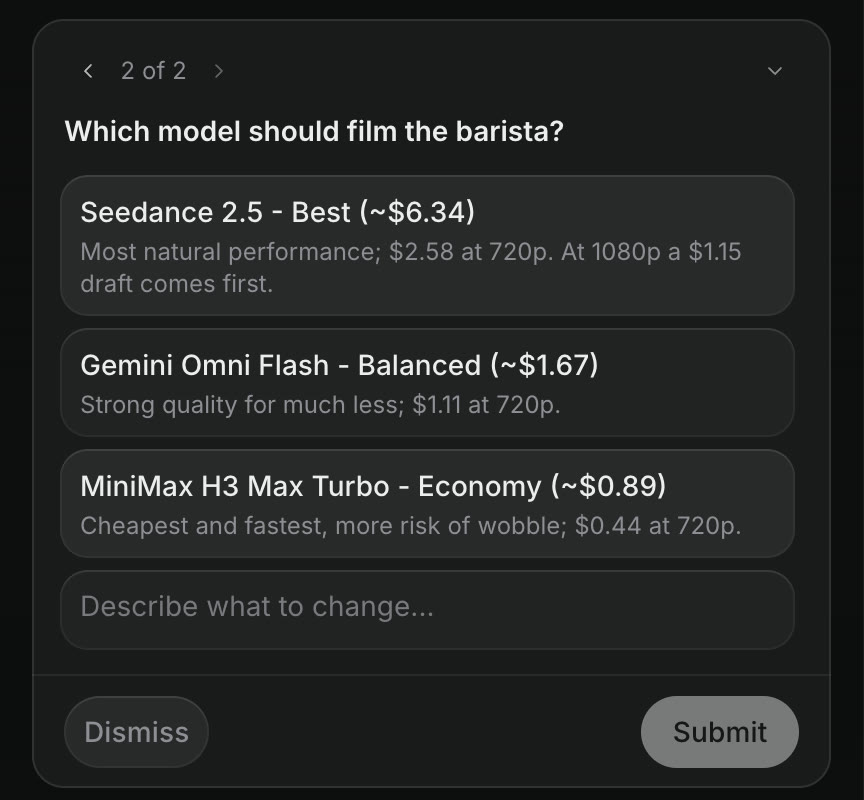
A question from the Craze agent: Which model should film the barista? with three choices, Seedance 2.5, Gemini Omni Flash and MiniMax H3 Max Turbo, each with its price, and Dismiss and Submit buttons.
A Craze question card with a model choice and the price of each option.

What does the Craze agent ask you to approve before the plan?

For a video with a story or spoken words, the Craze agent usually shows you the script in the chat first and waits for your agreement before designing visuals. When a character, product or place has to look the same across several shots, the Craze agent may also make a reference sheet and ask you to approve it, with a box for corrections such as "make her hair shorter". When a camera move matters, the Craze agent can build a rough 3D mock-up of the shot for you to approve before any footage is made. Each of these is cheap to change, which is why the Craze agent settles them before generating video.

What does a plan from the Craze agent look like?

A Craze plan shows what will be made before the Craze agent spends credits on generating video. It comes in one of two forms:

  • A shot list in the chat, for a short video with a few shots. Each shot is numbered, with its length, what happens, who is in it, and any spoken line or on-screen words, followed by how the video will sound.
  • A plan page, for a longer video with many shots or several scenes. A plan card appears in the Craze chat, titled with the plan's name or "Your plan is ready". Click View plan to open the plan in a Plan panel, or full screen on a phone. Depending on the video, the page shows the look, the cast, the story scene by scene, the sound, and the Craze agent's assumptions.

In both forms, the plan comes with the AI model choice and price for the expensive parts.

How do you approve a Craze plan?

You approve a Craze plan by answering the Craze agent's model and price question, or by replying in the chat that it should go ahead. When the Craze agent asks you to pick a model with its price, your answer is the approval: the Craze agent starts generating with the model you chose. If the plan is a page, a Read the plan button may appear with the question so you can read the plan before answering. After you approve, the Craze agent doesn't ask again for each small change to the plan during production.

How do you change a Craze plan?

You change a Craze plan by replying in the chat with what you want different, before you approve it. For example:

  • "Make shot 2 longer and cut shot 5."
  • "Use a warmer colour palette."
  • "Change the voice to someone older and calmer."
  • "Swap the model for a cheaper one."

The Craze agent updates the plan and shows it again. Changing a plan costs only the Craze agent's own running credits, which are small next to generating; the cost of generating starts only once the Craze agent starts generating. To point at one exact line, select the text in the Craze agent's reply and click Add to chat, then add your comment.

What happens after you approve the Craze plan?

After you approve, the Craze agent generates the clips, voice, music and sound, then assembles them on the timeline in the Editor. Finished files land in the Gallery as they arrive. You can keep chatting while the Craze agent works, or close the tab; Craze keeps working. When the video is ready, watch it in the player, then ask for changes or export it from the Craze Editor.

Questions people ask

No. The Craze agent shows the plan, with the model and price for the expensive parts, before it generates the video. Talking the plan through uses only the credits the Craze agent itself runs on, which are small next to generating; the cost of generating starts once you approve.

Yes. Click Dismiss on the Craze question card to close it without answering, or reply in the chat with your own instructions instead.

Yes. Tell the Craze agent what to change in the chat at any time. Clips that were already generated keep their cost, so it is cheapest to change the plan before you approve it.

PreviousDescribe your video to the Craze agentNextPoint at what to change with Tweak
Table of contents
  • Why does the Craze agent ask questions?
  • How do you answer the Craze agent's questions?
  • What does the Craze agent ask you to approve before the plan?
  • What does a plan from the Craze agent look like?
  • How do you approve a Craze plan?
  • How do you change a Craze plan?
  • What happens after you approve the Craze plan?
  • Direct
  • Create
  • Edit
  • Models
  • Pricing
  • MCP
  • Contact us
  • Docs
  • Blogs
  • Changelog
  • Privacy
  • Terms
  • Instagram
  • YouTube
  • X
  • LinkedIn
  • English
  • 日本語
  • 한국어
  • Español
  • Deutsch
  • Français
  • Português
  • 简体中文

© 2026 Craze Technologies