Craze
ModelsPricingMCPBlog

Search the docs

Find an article or a question in the Craze docs.

Get started

  • What is Craze?
  • Make your first video
  • A tour of the Craze app
  • Use Craze on your phone
  • Words to know

Work with the Craze agent

  • Describe your video to the Craze agent
  • Answer questions and approve the plan
  • Point at what to change with Tweak
  • Mention files, voices and projects
  • Choose the agent's tier: Efficient, Balanced or Power
  • What the Craze agent can do
  • Go back to an earlier version
  • Write a great brief

Create images, video and sound

  • Make media without the agent
  • Create an image
  • Create a video clip
  • Try a draft first
  • Edit, extend and upscale
  • Remove a background
  • Lip sync and talking photos
  • Motion transfer
  • Voiceovers and voices
  • Music and sound effects
  • Dub a video into another language

Start from a video

  • Start from a template
  • Remake a video
  • Swap people in a video

Edit on the timeline

  • Timeline basics
  • Sequences
  • Trim, split and change speed
  • Captions and transcripts
  • Transitions
  • Effects
  • Animations and keyframes
  • Text and fonts
  • Masks and cutouts
  • Audio
  • Keyboard shortcuts

Your media

  • Upload your files
  • Use the Gallery

Export and share

  • Export a video
  • Share a video with a link

Recipes

  • Make a product ad from product photos
  • Make a UGC-style creator video
  • Turn a talking-head recording into short clips
  • Make a music video cut to the beat

AI models

  • Which AI model should you use in Craze?

Plans and credits

  • Plans and credits

Use Craze from your agent

  • Connect your AI agent to Craze

Account and help

  • Your account and workspace
  • Fix a problem
Browse the docs

Get started

  • What is Craze?
  • Make your first video
  • A tour of the Craze app
  • Use Craze on your phone
  • Words to know

Work with the Craze agent

  • Describe your video to the Craze agent
  • Answer questions and approve the plan
  • Point at what to change with Tweak
  • Mention files, voices and projects
  • Choose the agent's tier: Efficient, Balanced or Power
  • What the Craze agent can do
  • Go back to an earlier version
  • Write a great brief

Create images, video and sound

  • Make media without the agent
  • Create an image
  • Create a video clip
  • Try a draft first
  • Edit, extend and upscale
  • Remove a background
  • Lip sync and talking photos
  • Motion transfer
  • Voiceovers and voices
  • Music and sound effects
  • Dub a video into another language

Start from a video

  • Start from a template
  • Remake a video
  • Swap people in a video

Edit on the timeline

  • Timeline basics
  • Sequences
  • Trim, split and change speed
  • Captions and transcripts
  • Transitions
  • Effects
  • Animations and keyframes
  • Text and fonts
  • Masks and cutouts
  • Audio
  • Keyboard shortcuts

Your media

  • Upload your files
  • Use the Gallery

Export and share

  • Export a video
  • Share a video with a link

Recipes

  • Make a product ad from product photos
  • Make a UGC-style creator video
  • Turn a talking-head recording into short clips
  • Make a music video cut to the beat

AI models

  • Which AI model should you use in Craze?

Plans and credits

  • Plans and credits

Use Craze from your agent

  • Connect your AI agent to Craze

Account and help

  • Your account and workspace
  • Fix a problem
Docs/Create images, video and sound

Voiceovers and voices

Craze makes voiceovers from a script with the Voice task in the Audio tab, lets you pick from stock voices or design and save your own for the whole workspace, and changes the voice in an existing recording with Voice changer.

Last updated November 18, 2026

How do you make a voiceover in Craze?

You make a voiceover in Craze with the Voice task in the Audio tab.

  1. Open the Audio tab on the Craze home page, or click Make in a project and switch to Audio. It opens on the Voice task.
  2. Check the Model, or click Change to pick another.
  3. Click Voice and choose a voice.
  4. Write the Script, exactly what the voice will say.
  5. Click Generate. The button shows the price, which follows the length of the script as you type.

The voiceover appears in the project's Gallery. Generate the whole script in one take so the voice and energy stay the same throughout. You can also ask the Craze agent, which writes the script, picks a voice and places the voiceover on the timeline.
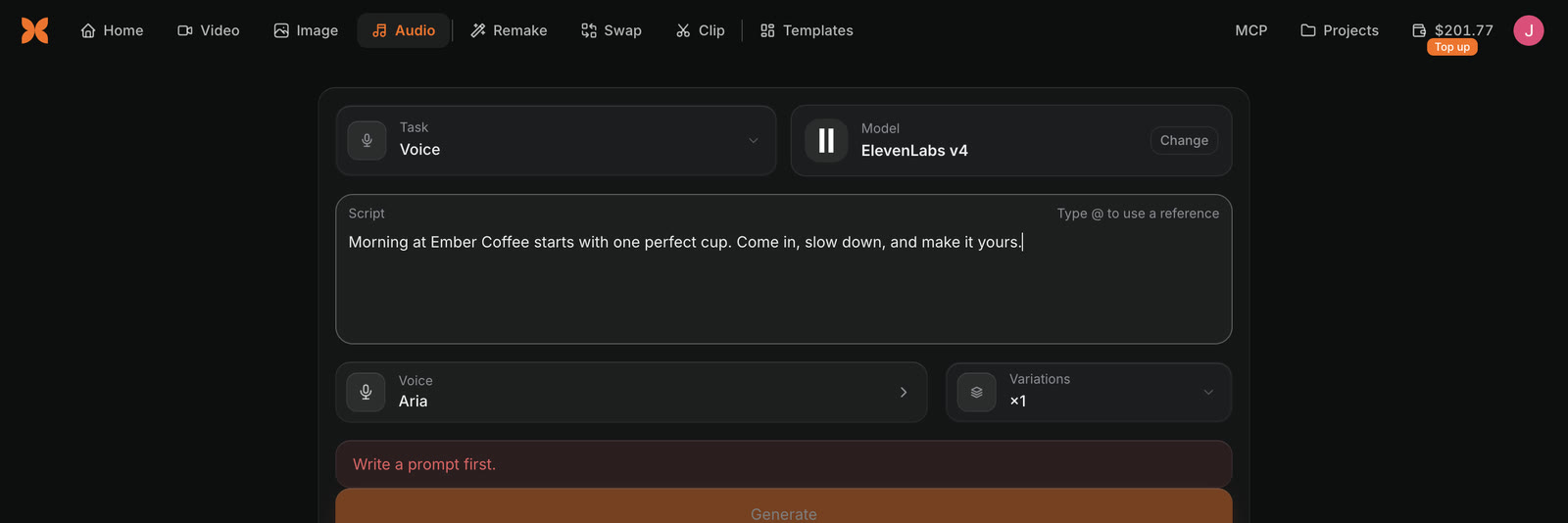
The Craze Audio tab with Task Voice, Model ElevenLabs v4, a script about Ember Coffee typed into Script, Voice Aria, Variations x1 and the Generate button.
A voiceover script and voice set in the Craze Audio tab.

Which voice models does Craze have?

Craze has several voice models, listed under Change in the Audio tab when Task is Voice. Examples include ElevenLabs v4, which is strong for English, and Gemini 3.8 Flash TTS, which reads scripts mostly in another language, or that switch languages, noticeably better. Some models also take a Voice direction (optional), a short note on how the line should sound.

See the Craze models page for every voice model and its prices.

How do you choose a voice in Craze?

Clicking Voice in the Craze Audio tab opens Choose a voice.

  1. Filter the list with All, Female or Male, where the model's voices list them.
  2. Play any voice to hear it before you generate.
  3. Click a voice to choose it.

The voices on offer depend on the model, because each voice model has its own voices. Custom voices from your workspace are under the Workspace voices filter, on models that can use them.

How do you design your own voice in Craze?

Craze designs a new voice from a written description.

  1. Open Choose a voice and click Design a voice.
  2. In Description, describe who is speaking and how they sound. Age, accent, tone and pace all help.
  3. Give the voice a Name.
  4. Click Create previews. The button shows the price. Craze designs three takes in about 15 seconds.
  5. Play Take 1, Take 2 and Take 3, pick the one you like and click Save voice.

The saved voice appears under Workspace voices in every project. You can also ask the Craze agent, for example "Design a warm, older storyteller voice and narrate my script with it."

How do custom voices work for a Craze workspace?

A custom voice saved in Craze belongs to the whole workspace, so everyone in the workspace can narrate with it in any project. A Craze workspace keeps up to 3 custom voices, and Design a voice is greyed out when all 3 are saved. To make room, delete one under Workspace voices in Choose a voice. A deleted voice disappears for everyone in the workspace, but audio already made with it stays.

Can Craze clone a voice?

Craze clones a voice with Kling Voice Clone, through the Craze agent.

  1. Upload a clean recording of one person speaking, 5 to 30 seconds long.
  2. Ask the Craze agent, for example "Clone this voice with Kling Voice Clone and have my character speak with it."

A Kling Voice Clone voice speaks only inside Kling 4 and Kling O3 videos, for a character on screen. It does not read voiceovers; for a voiceover, choose a stock voice or design a custom voice.

How do you change the voice in a recording with Craze?

Voice changer in Craze keeps the words and timing of a recording and swaps the voice.

  1. In the Craze Audio tab, set Task to Voice changer.
  2. Add the Recording.
  3. Click Voice and choose the new voice.
  4. Click Generate.

Craze changes voices with ElevenLabs Voice Changer, for recordings up to an hour long. In a project, Change voice in the More menu of an audio clip in the Gallery opens this task with the clip already added.

Questions people ask

Yes. Open the Audio tab in Craze, keep the Voice task, choose a voice, paste your script and click Generate. Craze uses models such as ElevenLabs v4 and Gemini 3.8 Flash TTS.

Yes. Click Design a voice in the Craze voice picker, describe the voice, choose one of three takes and click Save voice. The voice is saved for everyone in your workspace.

A Craze workspace keeps up to 3 custom voices. Delete a saved voice to make room for a new one.

Craze clones a voice from a 5 to 30 second recording with Kling Voice Clone, through the Craze agent. A cloned voice speaks only inside Kling 4 and Kling O3 videos, not in voiceovers.

PreviousMotion transferNextMusic and sound effects
Table of contents
  • How do you make a voiceover in Craze?
  • Which voice models does Craze have?
  • How do you choose a voice in Craze?
  • How do you design your own voice in Craze?
  • How do custom voices work for a Craze workspace?
  • Can Craze clone a voice?
  • How do you change the voice in a recording with Craze?
  • Direct
  • Create
  • Edit
  • Models
  • Pricing
  • MCP
  • Contact us
  • Docs
  • Blogs
  • Changelog
  • Privacy
  • Terms
  • Instagram
  • YouTube
  • X
  • LinkedIn
  • English
  • 日本語
  • 한국어
  • Español
  • Deutsch
  • Français
  • Português
  • 简体中文

© 2026 Craze Technologies