Craze
ModelsPricingMCPBlog

Search the docs

Find an article or a question in the Craze docs.

Get started

  • What is Craze?
  • Make your first video
  • A tour of the Craze app
  • Use Craze on your phone
  • Words to know

Work with the Craze agent

  • Describe your video to the Craze agent
  • Answer questions and approve the plan
  • Point at what to change with Tweak
  • Mention files, voices and projects
  • Choose the agent's tier: Efficient, Balanced or Power
  • What the Craze agent can do
  • Go back to an earlier version
  • Write a great brief

Create images, video and sound

  • Make media without the agent
  • Create an image
  • Create a video clip
  • Try a draft first
  • Edit, extend and upscale
  • Remove a background
  • Lip sync and talking photos
  • Motion transfer
  • Voiceovers and voices
  • Music and sound effects
  • Dub a video into another language

Start from a video

  • Start from a template
  • Remake a video
  • Swap people in a video

Edit on the timeline

  • Timeline basics
  • Sequences
  • Trim, split and change speed
  • Captions and transcripts
  • Transitions
  • Effects
  • Animations and keyframes
  • Text and fonts
  • Masks and cutouts
  • Audio
  • Keyboard shortcuts

Your media

  • Upload your files
  • Use the Gallery

Export and share

  • Export a video
  • Share a video with a link

Recipes

  • Make a product ad from product photos
  • Make a UGC-style creator video
  • Turn a talking-head recording into short clips
  • Make a music video cut to the beat

AI models

  • Which AI model should you use in Craze?

Plans and credits

  • Plans and credits

Use Craze from your agent

  • Connect your AI agent to Craze

Account and help

  • Your account and workspace
  • Fix a problem
Browse the docs

Get started

  • What is Craze?
  • Make your first video
  • A tour of the Craze app
  • Use Craze on your phone
  • Words to know

Work with the Craze agent

  • Describe your video to the Craze agent
  • Answer questions and approve the plan
  • Point at what to change with Tweak
  • Mention files, voices and projects
  • Choose the agent's tier: Efficient, Balanced or Power
  • What the Craze agent can do
  • Go back to an earlier version
  • Write a great brief

Create images, video and sound

  • Make media without the agent
  • Create an image
  • Create a video clip
  • Try a draft first
  • Edit, extend and upscale
  • Remove a background
  • Lip sync and talking photos
  • Motion transfer
  • Voiceovers and voices
  • Music and sound effects
  • Dub a video into another language

Start from a video

  • Start from a template
  • Remake a video
  • Swap people in a video

Edit on the timeline

  • Timeline basics
  • Sequences
  • Trim, split and change speed
  • Captions and transcripts
  • Transitions
  • Effects
  • Animations and keyframes
  • Text and fonts
  • Masks and cutouts
  • Audio
  • Keyboard shortcuts

Your media

  • Upload your files
  • Use the Gallery

Export and share

  • Export a video
  • Share a video with a link

Recipes

  • Make a product ad from product photos
  • Make a UGC-style creator video
  • Turn a talking-head recording into short clips
  • Make a music video cut to the beat

AI models

  • Which AI model should you use in Craze?

Plans and credits

  • Plans and credits

Use Craze from your agent

  • Connect your AI agent to Craze

Account and help

  • Your account and workspace
  • Fix a problem
Docs/Create images, video and sound

Motion transfer

Craze Motion transfer makes a character from your picture copy the movement in another video, such as a dance, a gesture or a walk, from the Motion transfer task in the Video tab or Drive with motion in the Gallery.

Last updated November 18, 2026

What is motion transfer in Craze?

Motion transfer in Craze takes the movement from one video and gives it to a character from a picture. The character can be a person, a mascot or an illustrated figure, and the movement can be a dance, a gesture, a walk or a full performance. The result is a new video of your character moving the way the person in the motion video moves.

How do you transfer motion to a character in Craze?

To make a character copy the movement in a video in Craze:

  1. Open the Video tab on the Craze home page, or click Make in a project and switch to Video.
  2. Set Task to Motion transfer.
  3. Add the Character, a clear full picture of who should move.
  4. Add the Motion video with the movement to copy, by upload, from the project, or with a link to a public video.
  5. In the prompt, describe the character and the setting the motion plays out in.
  6. Click Generate. The button shows the price.

The result appears in the project's Gallery. Models such as Kling 3 Standard and DreamActor 2 do motion transfer; see the Craze models page for every model and its prices.
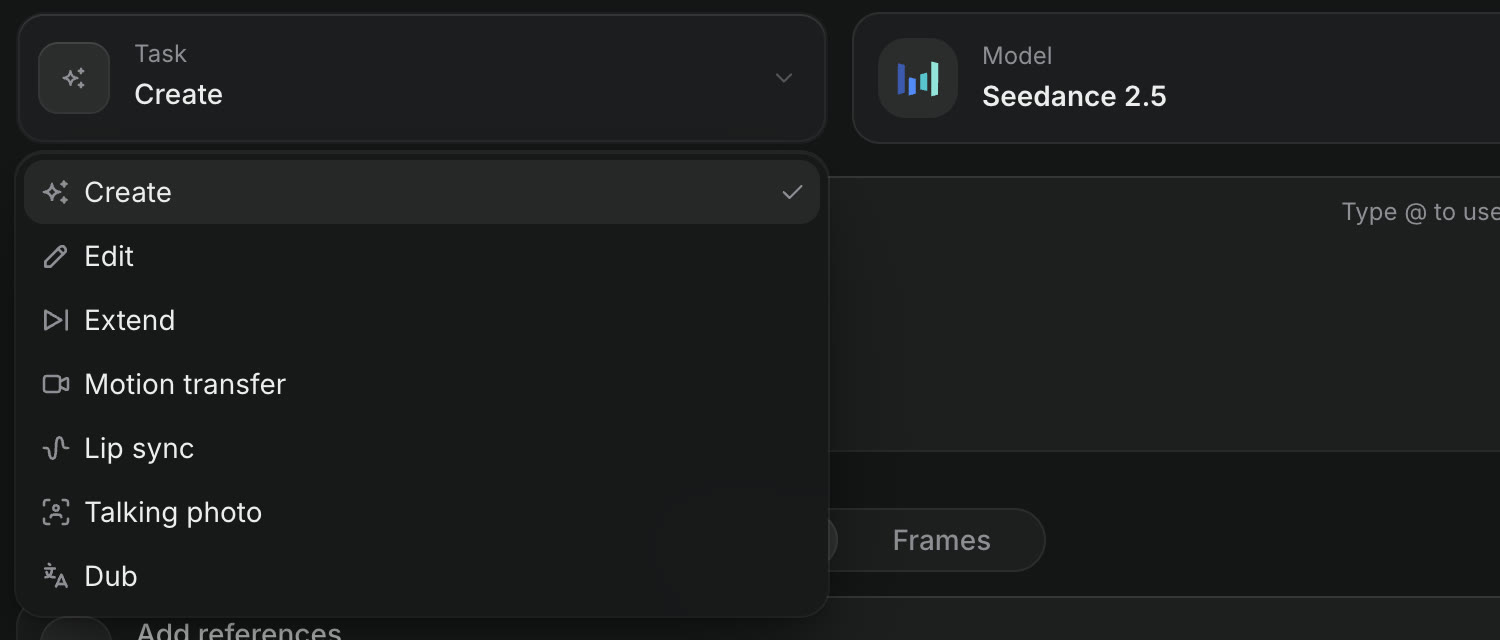
The Task menu in the Craze Video tab, open, listing Create, Edit, Extend, Motion transfer, Lip sync, Talking photo and Dub.
Motion transfer is a task in the Craze Video tab.

How do you start motion transfer from the Craze Gallery?

The Craze Gallery starts motion transfer from a picture you already have. Open the More menu on an image in the Gallery and choose Drive with motion under "Make something from this". Craze opens the Motion transfer task with the image as the Character, so you only add the Motion video and click Generate.

How do you replace several people in a video with Craze?

Some Craze motion transfer models, such as MiniMax H3 Max Recast, take more than one character.

  1. In the Craze Video tab, set Task to Motion transfer and choose a model that takes several characters.
  2. Add a picture in each Character box, in order: Character 1, Character 2 and so on.
  3. Add the Motion video.
  4. In Who becomes whom, say which picture replaces which person, for example "the second picture replaces the man on the left; keep the outfits".
  5. Click Generate.

How do you restyle a whole shot with motion from another video in Craze?

Some Craze models, such as Kling O3 Pro, use the motion video as a guide for a whole new shot rather than for one character. With one of these models, the prompt box reads Describe the new video: describe the new shot, and it follows the motion video's movement and camera. Use it to keep the timing and camera move of a clip while changing who is in it, where it happens and how it looks.

How do you get good results from Craze motion transfer?

Craze motion transfer works best when the two inputs match:

  • Show the whole character. If the motion video shows a full body, use a full-body picture of the character.
  • Pick a clear motion video. One person, steady framing, and nothing covering the body.

If a take misses, click Reuse on the result in the Gallery to load the same inputs, try another model, and generate again. You can also ask the Craze agent in the chat, for example "make my mascot do the dance in this clip", and attach both files.

Tip

To replace the people in a 4 to 30 second video, starting from your own video or a template, try the Swap tab on the Craze home page.

Questions people ask

Yes. Choose the Motion transfer task in the Craze Video tab, add your Character picture and the Motion video of the dance, and click Generate. Craze uses models such as Kling 3 Standard and DreamActor 2.

Yes. On a Craze motion transfer model that takes more than one character, such as MiniMax H3 Max Recast, you add a picture for each person and describe who becomes whom.

Motion transfer in Craze is a single generation in Make, where you pick the model and settings yourself. Swap is a separate Craze tool on the home page that replaces the people in a video with characters from your photos.

PreviousLip sync and talking photosNextVoiceovers and voices
Table of contents
  • What is motion transfer in Craze?
  • How do you transfer motion to a character in Craze?
  • How do you start motion transfer from the Craze Gallery?
  • How do you replace several people in a video with Craze?
  • How do you restyle a whole shot with motion from another video in Craze?
  • How do you get good results from Craze motion transfer?
  • Direct
  • Create
  • Edit
  • Models
  • Pricing
  • MCP
  • Contact us
  • Docs
  • Blogs
  • Changelog
  • Privacy
  • Terms
  • Instagram
  • YouTube
  • X
  • LinkedIn
  • English
  • 日本語
  • 한국어
  • Español
  • Deutsch
  • Français
  • Português
  • 简体中文

© 2026 Craze Technologies