Craze
ModelsPricingMCPBlog

Search the docs

Find an article or a question in the Craze docs.

Get started

  • What is Craze?
  • Make your first video
  • A tour of the Craze app
  • Use Craze on your phone
  • Words to know

Work with the Craze agent

  • Describe your video to the Craze agent
  • Answer questions and approve the plan
  • Point at what to change with Tweak
  • Mention files, voices and projects
  • Choose the agent's tier: Efficient, Balanced or Power
  • What the Craze agent can do
  • Go back to an earlier version
  • Write a great brief

Create images, video and sound

  • Make media without the agent
  • Create an image
  • Create a video clip
  • Try a draft first
  • Edit, extend and upscale
  • Remove a background
  • Lip sync and talking photos
  • Motion transfer
  • Voiceovers and voices
  • Music and sound effects
  • Dub a video into another language

Start from a video

  • Start from a template
  • Remake a video
  • Swap people in a video

Edit on the timeline

  • Timeline basics
  • Sequences
  • Trim, split and change speed
  • Captions and transcripts
  • Transitions
  • Effects
  • Animations and keyframes
  • Text and fonts
  • Masks and cutouts
  • Audio
  • Keyboard shortcuts

Your media

  • Upload your files
  • Use the Gallery

Export and share

  • Export a video
  • Share a video with a link

Recipes

  • Make a product ad from product photos
  • Make a UGC-style creator video
  • Turn a talking-head recording into short clips
  • Make a music video cut to the beat

AI models

  • Which AI model should you use in Craze?

Plans and credits

  • Plans and credits

Use Craze from your agent

  • Connect your AI agent to Craze

Account and help

  • Your account and workspace
  • Fix a problem
Browse the docs

Get started

  • What is Craze?
  • Make your first video
  • A tour of the Craze app
  • Use Craze on your phone
  • Words to know

Work with the Craze agent

  • Describe your video to the Craze agent
  • Answer questions and approve the plan
  • Point at what to change with Tweak
  • Mention files, voices and projects
  • Choose the agent's tier: Efficient, Balanced or Power
  • What the Craze agent can do
  • Go back to an earlier version
  • Write a great brief

Create images, video and sound

  • Make media without the agent
  • Create an image
  • Create a video clip
  • Try a draft first
  • Edit, extend and upscale
  • Remove a background
  • Lip sync and talking photos
  • Motion transfer
  • Voiceovers and voices
  • Music and sound effects
  • Dub a video into another language

Start from a video

  • Start from a template
  • Remake a video
  • Swap people in a video

Edit on the timeline

  • Timeline basics
  • Sequences
  • Trim, split and change speed
  • Captions and transcripts
  • Transitions
  • Effects
  • Animations and keyframes
  • Text and fonts
  • Masks and cutouts
  • Audio
  • Keyboard shortcuts

Your media

  • Upload your files
  • Use the Gallery

Export and share

  • Export a video
  • Share a video with a link

Recipes

  • Make a product ad from product photos
  • Make a UGC-style creator video
  • Turn a talking-head recording into short clips
  • Make a music video cut to the beat

AI models

  • Which AI model should you use in Craze?

Plans and credits

  • Plans and credits

Use Craze from your agent

  • Connect your AI agent to Craze

Account and help

  • Your account and workspace
  • Fix a problem
Docs/Create images, video and sound

Music and sound effects

Craze generates music and sound effects from a description with the Music and Sound effects tasks in the Audio tab, adds matching sound to a silent clip with Sound for video, and has 128 ready-made sound effects in the editor's Library.

Last updated November 18, 2026

How do you generate music in Craze?

You generate music in Craze with the Music task in the Audio tab.

  1. Open the Audio tab on the Craze home page, or click Make in a project and switch to Audio.
  2. Set Task to Music.
  3. Check the Model, or click Change to pick another.
  4. In Describe the music, give the genre, tempo, mood and how it builds, for example "dark synthwave at 120 BPM".
  5. Set the Duration where the model offers it, and click Generate. The button shows the price.

The track appears in the project's Gallery. Craze makes music with models such as Lyria 3 Pro and ElevenLabs Music; ElevenLabs Music makes tracks from 3 seconds to 5 minutes. See the Craze models page for every music model and its prices.
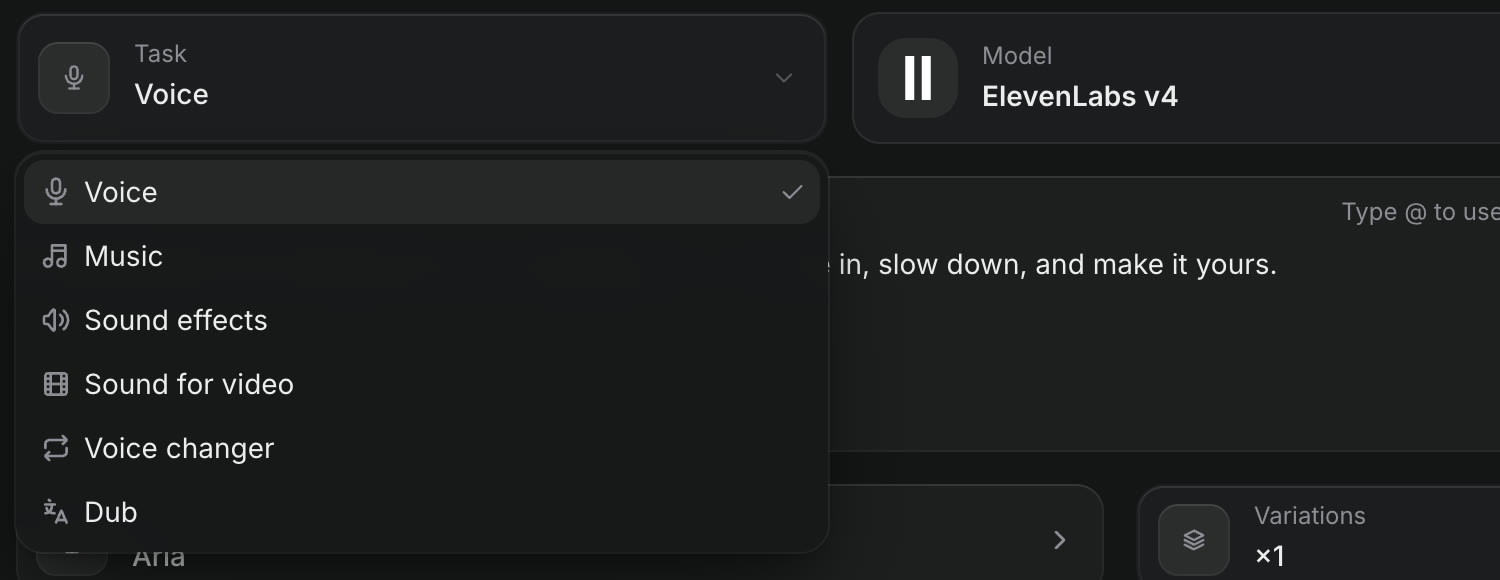
The Task menu in the Craze Audio tab, open, listing Voice, Music, Sound effects, Sound for video, Voice changer and Dub.
Music and Sound effects are tasks in the Craze Audio tab.

How do you generate a sound effect in Craze?

You generate a sound effect in Craze with the Sound effects task in the Audio tab.

  1. In the Craze Audio tab, set Task to Sound effects.
  2. In Describe the sound, say what makes the sound and where, for example "heavy door slams in an empty hall".
  3. Set the Duration and click Generate.

Craze makes sound effects with ElevenLabs Sound Effects V2, for sounds up to 22 seconds long. Set Variations to get up to 4 versions at once and keep the best.

How do you add matching sound to a silent video in Craze?

The Sound for video task in Craze generates sound that fits what happens in a clip, such as footsteps, traffic or a door closing.

  1. In the Craze Audio tab, set Task to Sound for video.
  2. Add the Video.
  3. Click Generate.

Craze makes the sound with models such as Hunyuan Video Foley, and the result is an audio clip in the Gallery that you put under the video on the timeline. In a project, Add sound in the More menu of a video in the Gallery opens this task with the clip already added.

How do you use the ready-made sound effects in the Craze Library?

The Craze editor's Library has 128 curated sound effects you can use without generating anything.

  1. In the Craze editor, open Library in the media panel, then Sounds.
  2. Search with "Search clicks, whooshes, impacts…", or pick a category from All categories.
  3. Play a sound to preview it.
  4. Click Add to timeline at playhead to place it where the playhead is.
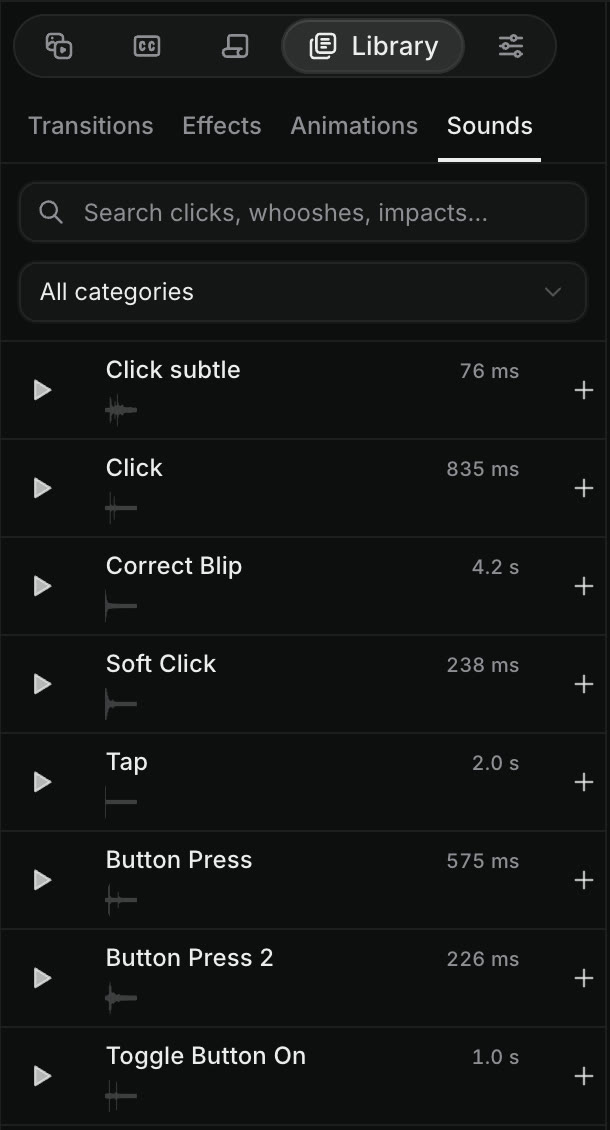
Library, then Sounds, in the Craze editor, with a Search clicks, whooshes, impacts box, an All categories menu, and sounds such as Click subtle, Click, Correct Blip, Soft Click, Tap and Button Press, each with a play button, its length and an add button.
Ready-made sound effects in the Craze Library, each with a play button.

The categories in the Craze Library's Sounds tab are:

  • Interface and feedback
  • Human reactions and movement
  • Everyday Foley
  • Nature and weather
  • Impacts and destruction
  • Comedy, cartoon, and meme-style
  • Places and ambience
  • Motion and transitions
  • Technology, games, and science fiction

The search box at the top of the Library also finds sounds alongside transitions, effects and animations.

Should you generate a sound effect or use the Craze Library?

Use the Craze Library's Sounds tab for common sounds, such as a click, a whoosh, a pop or a crowd laugh, because they are ready straight away. Generate a sound effect in the Craze Audio tab when you need something specific to your scene, such as "rain on a tin roof with distant thunder", or a sound that runs a set length.

Can the Craze agent add music and sound for you?

Yes. The Craze agent can generate a track or sound effects and place them on the timeline. Ask it in the chat, for example "add a calm piano track under the whole video and a whoosh on each cut". The Craze agent shows you the models and prices before it generates, and you can change the volume and timing on the timeline afterwards; see timeline basics.

Questions people ask

Yes. Choose the Music task in the Craze Audio tab, describe the genre, tempo and mood, set the length and click Generate. Craze makes music with models such as Lyria 3 Pro and ElevenLabs Music.

Yes. The Sound for video task in the Craze Audio tab watches the clip and generates sound that matches what happens on screen, with models such as Hunyuan Video Foley.

Yes. The Sounds tab in the Craze editor's Library has 128 curated sound effects, such as clicks, whooshes and impacts, that you can preview and add to the timeline.

Yes. Ask the Craze agent in the chat, for example "add an upbeat track under the whole video". The Craze agent generates the music and places it on the timeline.

PreviousVoiceovers and voicesNextDub a video into another language
Table of contents
  • How do you generate music in Craze?
  • How do you generate a sound effect in Craze?
  • How do you add matching sound to a silent video in Craze?
  • How do you use the ready-made sound effects in the Craze Library?
  • Should you generate a sound effect or use the Craze Library?
  • Can the Craze agent add music and sound for you?
  • Direct
  • Create
  • Edit
  • Models
  • Pricing
  • MCP
  • Contact us
  • Docs
  • Blogs
  • Changelog
  • Privacy
  • Terms
  • Instagram
  • YouTube
  • X
  • LinkedIn
  • English
  • 日本語
  • 한국어
  • Español
  • Deutsch
  • Français
  • Português
  • 简体中文

© 2026 Craze Technologies