Craze
ModelsPricingMCPBlog

Search the docs

Find an article or a question in the Craze docs.

Get started

  • What is Craze?
  • Make your first video
  • A tour of the Craze app
  • Use Craze on your phone
  • Words to know

Work with the Craze agent

  • Describe your video to the Craze agent
  • Answer questions and approve the plan
  • Point at what to change with Tweak
  • Mention files, voices and projects
  • Choose the agent's tier: Efficient, Balanced or Power
  • What the Craze agent can do
  • Go back to an earlier version
  • Write a great brief

Create images, video and sound

  • Make media without the agent
  • Create an image
  • Create a video clip
  • Try a draft first
  • Edit, extend and upscale
  • Remove a background
  • Lip sync and talking photos
  • Motion transfer
  • Voiceovers and voices
  • Music and sound effects
  • Dub a video into another language

Start from a video

  • Start from a template
  • Remake a video
  • Swap people in a video

Edit on the timeline

  • Timeline basics
  • Sequences
  • Trim, split and change speed
  • Captions and transcripts
  • Transitions
  • Effects
  • Animations and keyframes
  • Text and fonts
  • Masks and cutouts
  • Audio
  • Keyboard shortcuts

Your media

  • Upload your files
  • Use the Gallery

Export and share

  • Export a video
  • Share a video with a link

Recipes

  • Make a product ad from product photos
  • Make a UGC-style creator video
  • Turn a talking-head recording into short clips
  • Make a music video cut to the beat

AI models

  • Which AI model should you use in Craze?

Plans and credits

  • Plans and credits

Use Craze from your agent

  • Connect your AI agent to Craze

Account and help

  • Your account and workspace
  • Fix a problem
Browse the docs

Get started

  • What is Craze?
  • Make your first video
  • A tour of the Craze app
  • Use Craze on your phone
  • Words to know

Work with the Craze agent

  • Describe your video to the Craze agent
  • Answer questions and approve the plan
  • Point at what to change with Tweak
  • Mention files, voices and projects
  • Choose the agent's tier: Efficient, Balanced or Power
  • What the Craze agent can do
  • Go back to an earlier version
  • Write a great brief

Create images, video and sound

  • Make media without the agent
  • Create an image
  • Create a video clip
  • Try a draft first
  • Edit, extend and upscale
  • Remove a background
  • Lip sync and talking photos
  • Motion transfer
  • Voiceovers and voices
  • Music and sound effects
  • Dub a video into another language

Start from a video

  • Start from a template
  • Remake a video
  • Swap people in a video

Edit on the timeline

  • Timeline basics
  • Sequences
  • Trim, split and change speed
  • Captions and transcripts
  • Transitions
  • Effects
  • Animations and keyframes
  • Text and fonts
  • Masks and cutouts
  • Audio
  • Keyboard shortcuts

Your media

  • Upload your files
  • Use the Gallery

Export and share

  • Export a video
  • Share a video with a link

Recipes

  • Make a product ad from product photos
  • Make a UGC-style creator video
  • Turn a talking-head recording into short clips
  • Make a music video cut to the beat

AI models

  • Which AI model should you use in Craze?

Plans and credits

  • Plans and credits

Use Craze from your agent

  • Connect your AI agent to Craze

Account and help

  • Your account and workspace
  • Fix a problem
Docs/Work with the Craze agent

Point at what to change with Tweak

Tweak in Craze lets you click something in the preview, a timeline clip or an asset, add a comment, and send it to the Craze agent so it knows exactly what you want changed.

Last updated November 18, 2026

What does Tweak do in Craze?

Tweak in Craze lets you point at exactly what you want changed instead of describing where it is. You turn on Tweak, click something in the preview, a clip on the timeline or a file in Assets, and type a comment such as "make this text bigger" or "this shot is too dark". Craze adds the comment to the chat box with a screenshot of the spot you picked, and the Craze agent gets both when you send the message. Tweak is on a computer only.

How do you tweak something in the Craze preview?

You tweak something in the Craze preview with the Tweak button in the chat box.

  1. In a project, click Tweak in the Craze chat box. A bar at the top of the screen says "Select something in the preview, a timeline clip, or an asset to tweak."
  2. Move the pointer over the player. Craze outlines the element your click would pick, such as a title or a logo.
  3. Click the element, or click empty picture to pick a single point, or drag to mark an area.
  4. Type your comment in the box that appears ("Add a comment...").
  5. Press Enter or click the arrow. The tweak appears in the Craze chat box as a label with your comment.
  6. Add more tweaks or more text if you like, then click Send.

Press Esc or click Exit in the bar to leave Tweak without picking anything.
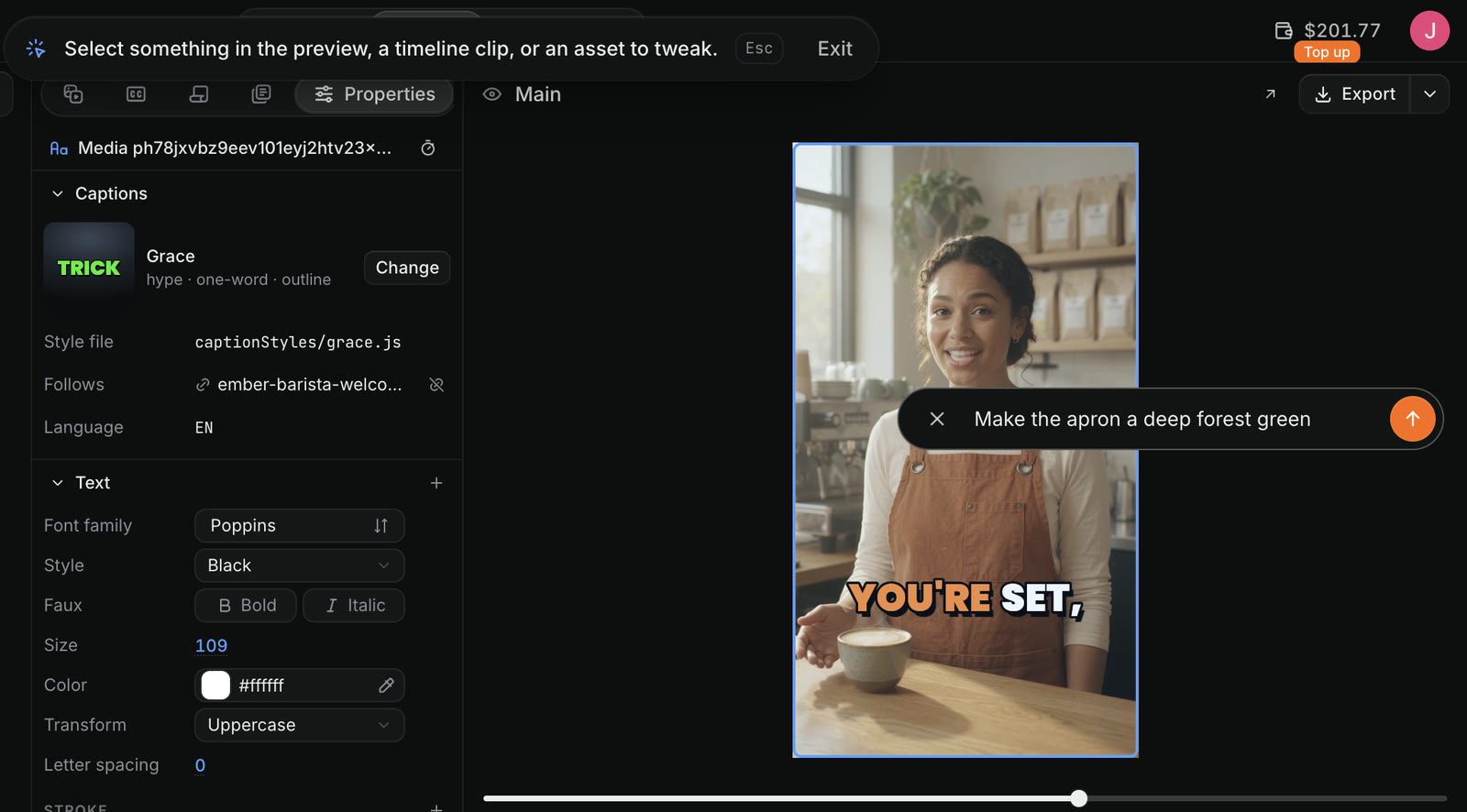
Tweak in Craze: a bar at the top reads Select something in the preview, a timeline clip, or an asset to tweak, with Esc and Exit, and the selected preview has an Add a comment box containing Make the apron a deep forest green.
A Craze tweak on the preview, with the comment typed in.

How do you tweak a timeline clip or an asset in Craze?

You tweak a Craze timeline clip or asset the same way as the preview. Click Tweak in the Craze chat box, then click the clip on the timeline or the file in the Assets panel, type your comment and press Enter. When the Gallery is showing, Tweak picks files in the Gallery instead, and the bar says "Select an asset to tweak."

You can also send a file to the chat without Tweak: open the file's menu in Assets or the Gallery and choose Add to chat. The file is added to your message so you can tell the Craze agent what to do with it.

How do you tweak a stretch of spoken words in Craze?

You tweak a stretch of spoken words from the Transcripts tab of the Craze media panel.

  1. Open Transcripts in the media panel of the Craze Editor.
  2. Select the words you want changed.
  3. Click Tweak in the bar of buttons on the transcript.
  4. Type your comment, such as "re-record this line with more energy", and send it with the button that shows the start and end time of your selection.

The Craze agent gets the exact time range along with your comment. The Craze guide to captions and transcripts covers the Transcripts tab in full.

How do you check or remove a tweak before sending it in Craze?

Each tweak waits in the Craze chat box as a label showing your comment. Hover the label to see the screenshot Craze took and the spot it points at. Click the small x on the label to remove the tweak. Nothing goes to the Craze agent until you send the message.

How do you quote part of the Craze agent's reply?

You quote part of a Craze agent reply by selecting its text in the chat.

  1. Select the words in the Craze agent's reply, such as one shot in a shot list.
  2. Click Add to chat, which appears next to your selection.
  3. Type your comment and click Add to chat.

The quote is added to your next message with your comment. A Craze message can hold up to 5 quotes, and each quote keeps up to 4,000 characters.

When should you use Tweak instead of typing in Craze?

Use Tweak in Craze when the thing you want changed is hard to name: one of several titles, a moment in a busy shot, or a clip among many similar ones. Type in the chat when the change is about the whole video, such as "make it 15 seconds" or "use calmer music". Both reach the same Craze agent, and you can mix them in one message.

Tip

Tweak works best with one change per comment. Three tweaks with one request each are clearer for the Craze agent than one tweak that asks for three things.

Questions people ask

A tweak in Craze is a comment attached to a specific thing, such as an object in the preview, a clip on the timeline, a file in Assets or a stretch of spoken words. The Craze agent gets your comment with a screenshot of what you pointed at.

No. Tweak in Craze needs a mouse or trackpad to aim at the preview, so it is only on a computer. On a phone, describe the change to the Craze agent in the chat.

Yes. In Craze you can add several tweaks to the chat box, add any text you like, and send them together in one message.

PreviousAnswer questions and approve the planNextMention files, voices and projects
Table of contents
  • What does Tweak do in Craze?
  • How do you tweak something in the Craze preview?
  • How do you tweak a timeline clip or an asset in Craze?
  • How do you tweak a stretch of spoken words in Craze?
  • How do you check or remove a tweak before sending it in Craze?
  • How do you quote part of the Craze agent's reply?
  • When should you use Tweak instead of typing in Craze?
  • Direct
  • Create
  • Edit
  • Models
  • Pricing
  • MCP
  • Contact us
  • Docs
  • Blogs
  • Changelog
  • Privacy
  • Terms
  • Instagram
  • YouTube
  • X
  • LinkedIn
  • English
  • 日本語
  • 한국어
  • Español
  • Deutsch
  • Français
  • Português
  • 简体中文

© 2026 Craze Technologies