Craze
ModelsPricingMCPBlog

Search the docs

Find an article or a question in the Craze docs.

Get started

  • What is Craze?
  • Make your first video
  • A tour of the Craze app
  • Use Craze on your phone
  • Words to know

Work with the Craze agent

  • Describe your video to the Craze agent
  • Answer questions and approve the plan
  • Point at what to change with Tweak
  • Mention files, voices and projects
  • Choose the agent's tier: Efficient, Balanced or Power
  • What the Craze agent can do
  • Go back to an earlier version
  • Write a great brief

Create images, video and sound

  • Make media without the agent
  • Create an image
  • Create a video clip
  • Try a draft first
  • Edit, extend and upscale
  • Remove a background
  • Lip sync and talking photos
  • Motion transfer
  • Voiceovers and voices
  • Music and sound effects
  • Dub a video into another language

Start from a video

  • Start from a template
  • Remake a video
  • Swap people in a video

Edit on the timeline

  • Timeline basics
  • Sequences
  • Trim, split and change speed
  • Captions and transcripts
  • Transitions
  • Effects
  • Animations and keyframes
  • Text and fonts
  • Masks and cutouts
  • Audio
  • Keyboard shortcuts

Your media

  • Upload your files
  • Use the Gallery

Export and share

  • Export a video
  • Share a video with a link

Recipes

  • Make a product ad from product photos
  • Make a UGC-style creator video
  • Turn a talking-head recording into short clips
  • Make a music video cut to the beat

AI models

  • Which AI model should you use in Craze?

Plans and credits

  • Plans and credits

Use Craze from your agent

  • Connect your AI agent to Craze

Account and help

  • Your account and workspace
  • Fix a problem
Browse the docs

Get started

  • What is Craze?
  • Make your first video
  • A tour of the Craze app
  • Use Craze on your phone
  • Words to know

Work with the Craze agent

  • Describe your video to the Craze agent
  • Answer questions and approve the plan
  • Point at what to change with Tweak
  • Mention files, voices and projects
  • Choose the agent's tier: Efficient, Balanced or Power
  • What the Craze agent can do
  • Go back to an earlier version
  • Write a great brief

Create images, video and sound

  • Make media without the agent
  • Create an image
  • Create a video clip
  • Try a draft first
  • Edit, extend and upscale
  • Remove a background
  • Lip sync and talking photos
  • Motion transfer
  • Voiceovers and voices
  • Music and sound effects
  • Dub a video into another language

Start from a video

  • Start from a template
  • Remake a video
  • Swap people in a video

Edit on the timeline

  • Timeline basics
  • Sequences
  • Trim, split and change speed
  • Captions and transcripts
  • Transitions
  • Effects
  • Animations and keyframes
  • Text and fonts
  • Masks and cutouts
  • Audio
  • Keyboard shortcuts

Your media

  • Upload your files
  • Use the Gallery

Export and share

  • Export a video
  • Share a video with a link

Recipes

  • Make a product ad from product photos
  • Make a UGC-style creator video
  • Turn a talking-head recording into short clips
  • Make a music video cut to the beat

AI models

  • Which AI model should you use in Craze?

Plans and credits

  • Plans and credits

Use Craze from your agent

  • Connect your AI agent to Craze

Account and help

  • Your account and workspace
  • Fix a problem
Docs/Start from a video

Remake a video

Craze Remake copies the pacing and editing style of a reference video you like and rebuilds it with your own footage, up to 20 files, in a Craze project.

Last updated November 18, 2026

What does Remake do in Craze?

Remake in Craze makes a new video in the style of one you like. You give Craze a reference video and your own footage. Craze studies the reference's cuts, on-screen text, music and speech, and the Craze agent then builds a new video with the same pacing and structure, using your content instead of the original's.

Where is Remake in Craze?

Remake is the Remake tab at the top of the Craze home page. Inside a project, Remake is a tab in the Make panel, next to Video, Image, Audio and Swap. You can also start Remake from:

  • A template. Open a template on the Templates page, click Remix and choose Remake.
  • A video in your Gallery. Click Remix on a video and choose Remake to use it as the reference.

How do you start a Remake in Craze?

To remake a video in Craze:

  1. Open Remake.
  2. Under Add a reference video, drop in a video, pick one from your files, or paste a link. You can also pick a template from the list below the form.
  3. Under Add your footage, add your own videos, images or audio, up to 20 files.
  4. Optionally, write Instructions, for example "Use the product shots first and keep it upbeat".
  5. Optionally, set Target length: Auto, 15 seconds, 30 seconds, 45 seconds, 1 minute, 90 seconds, 2 minutes, 3 minutes or 5 minutes.
  6. Click Remake.

From the Craze home page, Remake makes a new project for you. The Project menu beside the Remake button lets you pick a recent project instead.
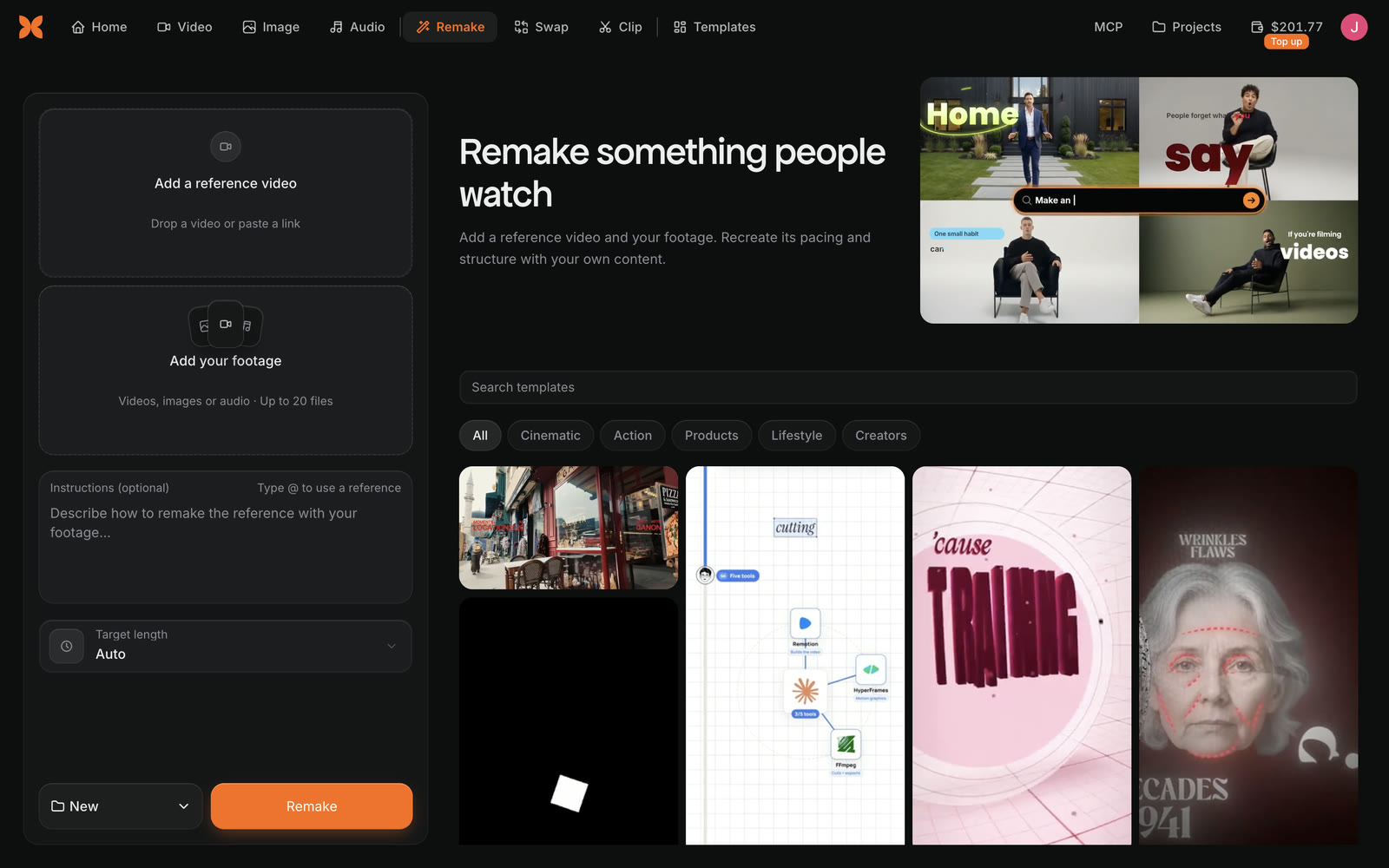
The Craze Remake tab with Add a reference video, Add your footage for up to 20 files, Instructions (optional), Target length Auto, a New project menu and the Remake button, next to a grid of templates with Search templates and category filters.
The Craze Remake form on the left and templates to remake on the right.

How do you use a video link in Craze Remake?

Craze Remake accepts a link to a public video in place of a file, for the reference video and for your footage. Paste the link into the Paste a video link box and click Add. Craze downloads the video first, and the button reads "Downloading video…" until it is ready.

Craze Remake accepts a linked video up to 10 minutes long and 512 MB in size. Instagram, X and other sites with public videos work. Craze can't import private videos, videos that need a login, or live streams. If a site blocks the download, download the video yourself and upload the file instead.

What happens after you start a Remake in Craze?

When you click Remake, Craze uploads your files and shows "Remake starts as soon as your files are ready." Keep the tab open until the uploads finish. A Remake card then appears in the Craze chat and moves through three stages: Reference, Your footage and Plan.

While Craze studies the reference, the card shows what it is doing, such as Finding the cuts, Reading on-screen text and layouts, Listening to the music and beat, and Transcribing the speech. It also counts the Cuts found, the Average shot length and how much of the reference it has Watched. When the study is done, a Style breakdown lists the reference's shots and style.

The Craze agent then plans the edit and builds the video on the timeline of your project. You can follow along in the chat and ask the Craze agent for changes as it works.

How do you cancel a Remake in Craze?

To cancel a Craze Remake:

  1. Click Cancel on the Remake card in the chat. Before uploads finish, Cancel is next to the "Remake starts as soon as your files are ready." message instead.
  2. Craze asks "Cancel this Remake?" and notes that you won't be charged for anything that hasn't started.
  3. Click Cancel Remake, or Keep going to let it finish.

The card then reads "Remake cancelled" and nothing is made from it.

How much does Remake cost in Craze?

Remake in Craze uses credits as it works: for studying the reference, and for the Craze agent's work making the video, like any chat with the Craze agent. Unlike Swap, the Remake button doesn't show a fixed price before you start. If you run out of credits, Craze asks you to add credits to continue. See the Craze pricing page for plans and credits.

Questions people ask

Yes. Remake in Craze studies a reference video's cuts, on-screen text, music and speech, then the Craze agent rebuilds that pacing and structure with your own footage.

Yes. Remake in Craze accepts a link to a public video on Instagram, X and other sites, up to 10 minutes long and 512 MB. Private videos, videos that need a login and live streams don't work.

Craze Remake takes up to 20 files of your own footage: videos, images or audio.

Yes. Click Cancel on the Remake card in the Craze chat and confirm with Cancel Remake. Craze doesn't charge for anything that hasn't started.

PreviousStart from a templateNextSwap people in a video
Table of contents
  • What does Remake do in Craze?
  • Where is Remake in Craze?
  • How do you start a Remake in Craze?
  • How do you use a video link in Craze Remake?
  • What happens after you start a Remake in Craze?
  • How do you cancel a Remake in Craze?
  • How much does Remake cost in Craze?
  • Direct
  • Create
  • Edit
  • Models
  • Pricing
  • MCP
  • Contact us
  • Docs
  • Blogs
  • Changelog
  • Privacy
  • Terms
  • Instagram
  • YouTube
  • X
  • LinkedIn
  • English
  • 日本語
  • 한국어
  • Español
  • Deutsch
  • Français
  • Português
  • 简体中文

© 2026 Craze Technologies