Craze
ModelsPricingMCPBlog

Search the docs

Find an article or a question in the Craze docs.

Get started

  • What is Craze?
  • Make your first video
  • A tour of the Craze app
  • Use Craze on your phone
  • Words to know

Work with the Craze agent

  • Describe your video to the Craze agent
  • Answer questions and approve the plan
  • Point at what to change with Tweak
  • Mention files, voices and projects
  • Choose the agent's tier: Efficient, Balanced or Power
  • What the Craze agent can do
  • Go back to an earlier version
  • Write a great brief

Create images, video and sound

  • Make media without the agent
  • Create an image
  • Create a video clip
  • Try a draft first
  • Edit, extend and upscale
  • Remove a background
  • Lip sync and talking photos
  • Motion transfer
  • Voiceovers and voices
  • Music and sound effects
  • Dub a video into another language

Start from a video

  • Start from a template
  • Remake a video
  • Swap people in a video

Edit on the timeline

  • Timeline basics
  • Sequences
  • Trim, split and change speed
  • Captions and transcripts
  • Transitions
  • Effects
  • Animations and keyframes
  • Text and fonts
  • Masks and cutouts
  • Audio
  • Keyboard shortcuts

Your media

  • Upload your files
  • Use the Gallery

Export and share

  • Export a video
  • Share a video with a link

Recipes

  • Make a product ad from product photos
  • Make a UGC-style creator video
  • Turn a talking-head recording into short clips
  • Make a music video cut to the beat

AI models

  • Which AI model should you use in Craze?

Plans and credits

  • Plans and credits

Use Craze from your agent

  • Connect your AI agent to Craze

Account and help

  • Your account and workspace
  • Fix a problem
Browse the docs

Get started

  • What is Craze?
  • Make your first video
  • A tour of the Craze app
  • Use Craze on your phone
  • Words to know

Work with the Craze agent

  • Describe your video to the Craze agent
  • Answer questions and approve the plan
  • Point at what to change with Tweak
  • Mention files, voices and projects
  • Choose the agent's tier: Efficient, Balanced or Power
  • What the Craze agent can do
  • Go back to an earlier version
  • Write a great brief

Create images, video and sound

  • Make media without the agent
  • Create an image
  • Create a video clip
  • Try a draft first
  • Edit, extend and upscale
  • Remove a background
  • Lip sync and talking photos
  • Motion transfer
  • Voiceovers and voices
  • Music and sound effects
  • Dub a video into another language

Start from a video

  • Start from a template
  • Remake a video
  • Swap people in a video

Edit on the timeline

  • Timeline basics
  • Sequences
  • Trim, split and change speed
  • Captions and transcripts
  • Transitions
  • Effects
  • Animations and keyframes
  • Text and fonts
  • Masks and cutouts
  • Audio
  • Keyboard shortcuts

Your media

  • Upload your files
  • Use the Gallery

Export and share

  • Export a video
  • Share a video with a link

Recipes

  • Make a product ad from product photos
  • Make a UGC-style creator video
  • Turn a talking-head recording into short clips
  • Make a music video cut to the beat

AI models

  • Which AI model should you use in Craze?

Plans and credits

  • Plans and credits

Use Craze from your agent

  • Connect your AI agent to Craze

Account and help

  • Your account and workspace
  • Fix a problem
Docs/Work with the Craze agent

Choose the agent's tier: Efficient, Balanced or Power

The Craze agent runs on one of three tiers, Efficient, Balanced or Power, which you pick from the model menu in the Craze chat box; Efficient is on every plan and Balanced and Power need a paid plan.

Last updated November 18, 2026

What are the Craze agent tiers?

The Craze agent tiers set how much thinking power the Craze agent uses when it plans, writes and edits your video. There are three, and the Craze model menu describes each in a few words:

TierHow the Craze model menu describes itCraze plans
EfficientQuick and light on creditsEvery plan, including Free
BalancedBest for most videosPro, Ultra and Max
PowerFor the most demanding videosPro, Ultra and Max

How do you change the Craze agent tier?

You change the Craze agent tier from the model menu in the Craze chat box.

  1. Click the tier name in the toolbar of the Craze chat box. It shows the tier in use, such as Efficient.
  2. Pick Efficient, Balanced or Power.
  3. Send your next message. The Craze agent uses the new tier from that message on.
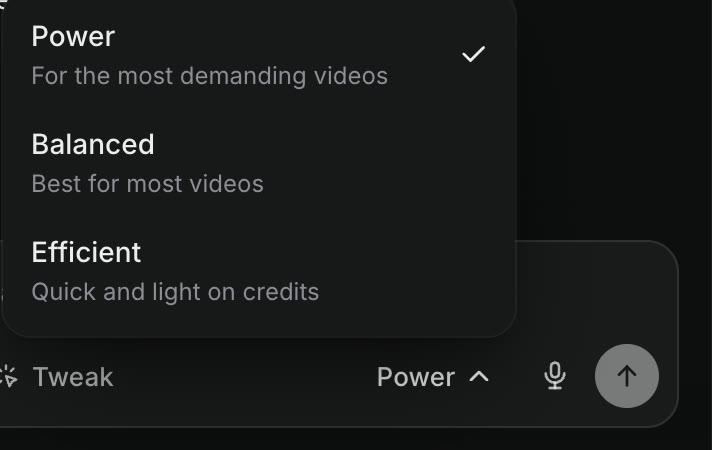
The Craze agent tier menu above the chat box: Power, For the most demanding videos, ticked; Balanced, Best for most videos; Efficient, Quick and light on credits.
The three Craze agent tiers, with Power selected.

A new Craze chat starts on the tier you used last.

Which Craze agent tier should you use?

The Craze agent tier to use depends on the job:

  • Efficient suits quick, clear jobs: a single image, a short clip, a caption fix or a simple timeline edit.
  • Balanced suits most videos: ads, social clips and explainers with a plan, several shots and sound.
  • Power suits the most demanding videos: long pieces with many scenes, complex motion graphics, or edits that need careful judgement across a lot of footage.

You can switch tiers in the middle of a Craze project, for example Power for the plan and Efficient for small fixes afterwards.

Do Craze agent tiers cost different amounts?

Yes. Running the Craze agent uses credits, and Efficient is the tier that is lightest on credits. Balanced and Power usually use more credits for the same conversation. Your usage is listed under Usage in the Craze account menu. The cost of generating video, images and audio doesn't depend on the tier; those prices are on the Craze models page.

Can you use Balanced or Power on the Craze Free plan?

No. On the Craze Free plan, the Craze agent runs on Efficient. In the model menu, Balanced and Power show a lock and a note such as "Balanced needs Pro". Choosing a locked tier opens the upgrade options, and any paid plan (Pro, Ultra or Max) unlocks both. Plan details are on the Craze pricing page.

Does the Craze agent tier change the video, image or audio models?

No. The Craze agent tier only changes the AI that thinks, plans and edits in the chat. The models that generate your video, images, voice, music and sound effects, such as Seedance, Kling or ElevenLabs, are the same on every tier and every plan, at the same prices.

Which AI models run the Craze agent tiers?

Craze names the AI behind some tiers in the Craze changelog. Efficient runs on GPT-6.2 Sol from OpenAI, and Power runs on Fable 5.2 from Anthropic. Craze can move a tier to a newer model over time; when it does, every chat on that tier uses the new model from its next message, with nothing for you to change.

Questions people ask

Use Balanced in Craze for most videos, Efficient for quick jobs that should be light on credits, and Power for your most demanding videos. On the Free plan, the Craze agent runs on Efficient.

No. The Craze agent tier only changes how the agent thinks and plans. The AI models that generate video, images and audio, and their prices, are the same on every tier.

The Craze agent's Efficient tier runs on GPT-6.2 Sol from OpenAI and its Power tier runs on Fable 5.2 from Anthropic, as announced in the Craze changelog.

PreviousMention files, voices and projectsNextWhat the Craze agent can do
Table of contents
  • What are the Craze agent tiers?
  • How do you change the Craze agent tier?
  • Which Craze agent tier should you use?
  • Do Craze agent tiers cost different amounts?
  • Can you use Balanced or Power on the Craze Free plan?
  • Does the Craze agent tier change the video, image or audio models?
  • Which AI models run the Craze agent tiers?
  • Direct
  • Create
  • Edit
  • Models
  • Pricing
  • MCP
  • Contact us
  • Docs
  • Blogs
  • Changelog
  • Privacy
  • Terms
  • Instagram
  • YouTube
  • X
  • LinkedIn
  • English
  • 日本語
  • 한국어
  • Español
  • Deutsch
  • Français
  • Português
  • 简体中文

© 2026 Craze Technologies