Craze
ModelsPricingMCPBlog

Search the docs

Find an article or a question in the Craze docs.

Get started

  • What is Craze?
  • Make your first video
  • A tour of the Craze app
  • Use Craze on your phone
  • Words to know

Work with the Craze agent

  • Describe your video to the Craze agent
  • Answer questions and approve the plan
  • Point at what to change with Tweak
  • Mention files, voices and projects
  • Choose the agent's tier: Efficient, Balanced or Power
  • What the Craze agent can do
  • Go back to an earlier version
  • Write a great brief

Create images, video and sound

  • Make media without the agent
  • Create an image
  • Create a video clip
  • Try a draft first
  • Edit, extend and upscale
  • Remove a background
  • Lip sync and talking photos
  • Motion transfer
  • Voiceovers and voices
  • Music and sound effects
  • Dub a video into another language

Start from a video

  • Start from a template
  • Remake a video
  • Swap people in a video

Edit on the timeline

  • Timeline basics
  • Sequences
  • Trim, split and change speed
  • Captions and transcripts
  • Transitions
  • Effects
  • Animations and keyframes
  • Text and fonts
  • Masks and cutouts
  • Audio
  • Keyboard shortcuts

Your media

  • Upload your files
  • Use the Gallery

Export and share

  • Export a video
  • Share a video with a link

Recipes

  • Make a product ad from product photos
  • Make a UGC-style creator video
  • Turn a talking-head recording into short clips
  • Make a music video cut to the beat

AI models

  • Which AI model should you use in Craze?

Plans and credits

  • Plans and credits

Use Craze from your agent

  • Connect your AI agent to Craze

Account and help

  • Your account and workspace
  • Fix a problem
Browse the docs

Get started

  • What is Craze?
  • Make your first video
  • A tour of the Craze app
  • Use Craze on your phone
  • Words to know

Work with the Craze agent

  • Describe your video to the Craze agent
  • Answer questions and approve the plan
  • Point at what to change with Tweak
  • Mention files, voices and projects
  • Choose the agent's tier: Efficient, Balanced or Power
  • What the Craze agent can do
  • Go back to an earlier version
  • Write a great brief

Create images, video and sound

  • Make media without the agent
  • Create an image
  • Create a video clip
  • Try a draft first
  • Edit, extend and upscale
  • Remove a background
  • Lip sync and talking photos
  • Motion transfer
  • Voiceovers and voices
  • Music and sound effects
  • Dub a video into another language

Start from a video

  • Start from a template
  • Remake a video
  • Swap people in a video

Edit on the timeline

  • Timeline basics
  • Sequences
  • Trim, split and change speed
  • Captions and transcripts
  • Transitions
  • Effects
  • Animations and keyframes
  • Text and fonts
  • Masks and cutouts
  • Audio
  • Keyboard shortcuts

Your media

  • Upload your files
  • Use the Gallery

Export and share

  • Export a video
  • Share a video with a link

Recipes

  • Make a product ad from product photos
  • Make a UGC-style creator video
  • Turn a talking-head recording into short clips
  • Make a music video cut to the beat

AI models

  • Which AI model should you use in Craze?

Plans and credits

  • Plans and credits

Use Craze from your agent

  • Connect your AI agent to Craze

Account and help

  • Your account and workspace
  • Fix a problem
Docs/Plans and credits

Plans and credits

Craze has four plans, Free, Pro, Ultra and Max, and every piece of work is paid for with credits shown in dollars: plan credits reset each month, and top-up credits from $5 last one year on any plan.

Last updated November 18, 2026

What plans does Craze have?

Craze has four plans: Free, Pro, Ultra and Max. Every Craze plan can use every image, video and audio model and Craze MCP; the plans differ in monthly credits, storage, agent tiers and export limits. This table compares what each Craze plan includes:

PlanCreditsStorageAgent tiersExportsTurn off the content filter
FreeLimited free usage1 GBEfficientUp to 720p at 30 frames per secondNo
ProPlan credits every month50 GBEfficient, Balanced, PowerNo resolution limitNo
UltraMore plan credits every month200 GBEfficient, Balanced, PowerNo resolution limitYes
MaxThe most plan credits every month1 TBEfficient, Balanced, PowerNo resolution limitYes

Speaking your prompt with voice input also needs Pro or above. Free usage is available to eligible accounts in supported regions. Prices and the exact monthly credits for each plan are on the Craze pricing page.

How do credits work in Craze?

Credits pay for everything Craze does for you, such as running the Craze agent, generating a video or transcribing a clip. Craze shows credits in dollars, so $1 of credits pays for $1 of work at Craze's prices. Your balance is in the top bar of every Craze page, and the price of a generation is shown before you start it.

Click your balance in the top bar, or choose Usage in the account menu (your avatar), to see the breakdown:

  • Plan credits come with a paid Craze plan and reset each month. Usage shows the date they next reset.
  • Top-up credits are extra credits you buy. They expire one year after purchase.
  • Promotional credits are credits from a Craze promotion.
  • Free credits are the Free plan's free usage.
  • Credits remaining is the total you can spend.

How do you buy more credits in Craze?

You buy Craze top-up credits in Usage, on any plan, including Free. Top-ups start at $5 and last for one year from purchase.

  1. Click your balance in the Craze top bar. Usage opens.
  2. Pick an amount, or choose Custom and type one in Amount (USD).
  3. Click Top up and pay.

Craze adds the credits to your balance as soon as the payment goes through. Only workspace admins can buy credits for a Craze workspace.
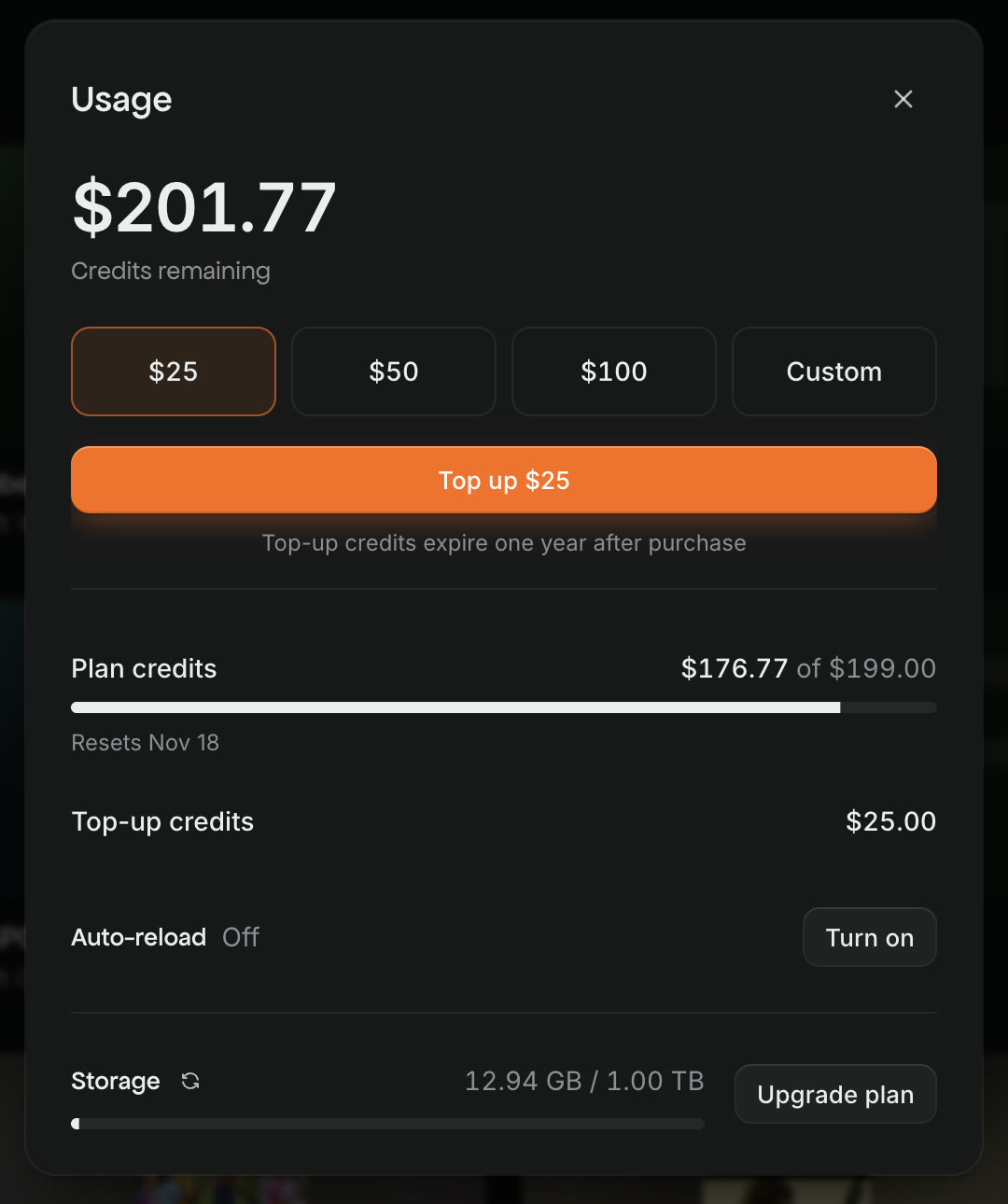
The Craze Usage window with Credits remaining at the top, preset top-up amounts and Custom, a Top up button, a note that top-up credits expire one year after purchase, Plan credits with their reset date, Top-up credits, Auto-reload Off with Turn on, and Storage with Upgrade plan.
Craze Usage shows your balance, top-ups, auto-reload and storage in one place.

How do you turn on auto-reload in Craze?

Auto-reload buys Craze top-up credits for you when your top-up credits run low, so a long job doesn't stop halfway.

  1. Open Usage from your balance in the Craze top bar.
  2. Next to Auto-reload, click Turn on.
  3. Set "When your top-up credits balance drops below:" and "Reload amount:".
  4. Click Turn on.

Auto-reload needs a saved payment method and works on any Craze plan, including Free. To change it later, click Edit next to Auto-reload; to stop it, click Turn off auto-reload. Credits bought by auto-reload expire one year after purchase, like any top-up.

Where can you see the credits added to your Craze account?

Craze lists every credit added to your workspace in Credit activity.

  1. Open the account menu (your avatar) and choose Billing.
  2. Next to Credit activity, click View.

The table shows the Date added, the Type (Plan, Top-up or Promotional), the Expiry date and the Amount of each credit. Credits that never expire say "Does not expire".

How do you change your Craze plan?

You change your Craze plan from Billing in the account menu (your avatar).

  1. Open the account menu and choose Billing.
  2. Click Upgrade plan, or Change plan if you are already on a paid plan.
  3. Pick a plan. Before you confirm an upgrade, Craze shows what is due today, minus the remaining usage from your current plan.

An upgrade starts straight away. A downgrade or a cancellation happens at the end of the billing cycle, and Billing shows the date it takes effect. If your files take up more storage than the lower plan includes, Craze warns you before you switch. To update your payment method or see invoices, click Manage next to Manage billing. Only workspace admins can manage billing.

What happens when you run out of credits in Craze?

When a Craze workspace runs out of credits, the Craze agent stops its run and posts a message in the chat saying so. No work is lost. Add credits or turn on auto-reload in Usage, then ask the Craze agent to continue. A single generation that costs more than your balance fails with a message that your balance was too low.

On the Craze Free plan, when your free usage is used up, add top-up credits or upgrade to a paid plan to keep going.

Tip

Auto-reload in Craze tops up your credits before they run out, so the Craze agent can finish long jobs without stopping.

What happens if a Craze payment fails or storage is full?

If a payment for your Craze plan fails, Craze shows "Your usage is restricted as you have an outstanding payment." Click Add Payment Method, or open Billing in the account menu, and pay the balance due to unlock your workspace.

If your Craze workspace uses more storage than its plan includes (1 GB on Free, 50 GB on Pro, 200 GB on Ultra, 1 TB on Max), AI generation and uploads pause. Delete projects you no longer need or upgrade to a plan with more storage to keep creating. Storage use is shown at the bottom of Usage.

Questions people ask

Yes. The Craze Free plan gives eligible accounts in supported regions a limited amount of free usage, 1 GB of storage, the Efficient agent tier, Craze MCP and exports up to 720p. Every image, video and audio model is available on Free.

Yes, depending on the kind. Craze plan credits reset each month, and top-up credits expire one year after purchase. Credit activity in Billing shows each credit's expiry date.

Yes. Craze top-up credits start at $5 and can be bought on any plan, including Free. They last for one year from purchase.

No work is lost. Craze stops the agent's run and says so in the chat. Add credits or turn on auto-reload, then ask the Craze agent to continue.

PreviousWhich AI model should you use in Craze?NextConnect your AI agent to Craze
Table of contents
  • What plans does Craze have?
  • How do credits work in Craze?
  • How do you buy more credits in Craze?
  • How do you turn on auto-reload in Craze?
  • Where can you see the credits added to your Craze account?
  • How do you change your Craze plan?
  • What happens when you run out of credits in Craze?
  • What happens if a Craze payment fails or storage is full?
  • Direct
  • Create
  • Edit
  • Models
  • Pricing
  • MCP
  • Contact us
  • Docs
  • Blogs
  • Changelog
  • Privacy
  • Terms
  • Instagram
  • YouTube
  • X
  • LinkedIn
  • English
  • 日本語
  • 한국어
  • Español
  • Deutsch
  • Français
  • Português
  • 简体中文

© 2026 Craze Technologies