Craze
ModelsPricingMCPBlog

Search the docs

Find an article or a question in the Craze docs.

Get started

  • What is Craze?
  • Make your first video
  • A tour of the Craze app
  • Use Craze on your phone
  • Words to know

Work with the Craze agent

  • Describe your video to the Craze agent
  • Answer questions and approve the plan
  • Point at what to change with Tweak
  • Mention files, voices and projects
  • Choose the agent's tier: Efficient, Balanced or Power
  • What the Craze agent can do
  • Go back to an earlier version
  • Write a great brief

Create images, video and sound

  • Make media without the agent
  • Create an image
  • Create a video clip
  • Try a draft first
  • Edit, extend and upscale
  • Remove a background
  • Lip sync and talking photos
  • Motion transfer
  • Voiceovers and voices
  • Music and sound effects
  • Dub a video into another language

Start from a video

  • Start from a template
  • Remake a video
  • Swap people in a video

Edit on the timeline

  • Timeline basics
  • Sequences
  • Trim, split and change speed
  • Captions and transcripts
  • Transitions
  • Effects
  • Animations and keyframes
  • Text and fonts
  • Masks and cutouts
  • Audio
  • Keyboard shortcuts

Your media

  • Upload your files
  • Use the Gallery

Export and share

  • Export a video
  • Share a video with a link

Recipes

  • Make a product ad from product photos
  • Make a UGC-style creator video
  • Turn a talking-head recording into short clips
  • Make a music video cut to the beat

AI models

  • Which AI model should you use in Craze?

Plans and credits

  • Plans and credits

Use Craze from your agent

  • Connect your AI agent to Craze

Account and help

  • Your account and workspace
  • Fix a problem
Browse the docs

Get started

  • What is Craze?
  • Make your first video
  • A tour of the Craze app
  • Use Craze on your phone
  • Words to know

Work with the Craze agent

  • Describe your video to the Craze agent
  • Answer questions and approve the plan
  • Point at what to change with Tweak
  • Mention files, voices and projects
  • Choose the agent's tier: Efficient, Balanced or Power
  • What the Craze agent can do
  • Go back to an earlier version
  • Write a great brief

Create images, video and sound

  • Make media without the agent
  • Create an image
  • Create a video clip
  • Try a draft first
  • Edit, extend and upscale
  • Remove a background
  • Lip sync and talking photos
  • Motion transfer
  • Voiceovers and voices
  • Music and sound effects
  • Dub a video into another language

Start from a video

  • Start from a template
  • Remake a video
  • Swap people in a video

Edit on the timeline

  • Timeline basics
  • Sequences
  • Trim, split and change speed
  • Captions and transcripts
  • Transitions
  • Effects
  • Animations and keyframes
  • Text and fonts
  • Masks and cutouts
  • Audio
  • Keyboard shortcuts

Your media

  • Upload your files
  • Use the Gallery

Export and share

  • Export a video
  • Share a video with a link

Recipes

  • Make a product ad from product photos
  • Make a UGC-style creator video
  • Turn a talking-head recording into short clips
  • Make a music video cut to the beat

AI models

  • Which AI model should you use in Craze?

Plans and credits

  • Plans and credits

Use Craze from your agent

  • Connect your AI agent to Craze

Account and help

  • Your account and workspace
  • Fix a problem
Docs/Edit on the timeline

Transitions

Craze has transitions such as Cross dissolve, Push, Circle iris and Glitch in Library > Transitions; drag one onto a cut, double-click it, or press ⌘D for a one-second Cross dissolve.

Last updated November 18, 2026

Where are transitions in Craze?

Craze transitions are in the Library tab of the media panel at the top left of the editor. Open Library, then Transitions. Each transition shows a moving preview when you hover over it, with a one-line description. To find one quickly, type in Search the library.

Which transitions does Craze have?

The Craze Library has these transitions:

TransitionGroupWhat it does
Cross dissolveDissolvesBlends the outgoing picture into the incoming one
Dip to blackDissolvesFades to black, then up into the incoming picture
Dip to whiteDissolvesFlashes through white into the incoming picture
Blur dissolveDissolvesDissolves through a soft blur
PushSlidesThe incoming picture pushes the outgoing one out of frame
Slide overSlidesThe incoming picture slides in over the outgoing one
Soft wipeWipesA feathered edge sweeps the incoming picture across
Circle irisWipesA circle opens on the incoming picture
GlitchStylizedA short digital glitch cut
Zoom throughWhole pictureZooms hard into the cut and back out on the next shot
Whip throughWhole pictureA fast whip pan out of one shot and into the next
Spin throughWhole pictureSpins half a turn into the cut and finishes it on the next shot

How do you add a transition in Craze?

To add a transition between two clips in Craze:

  1. Open Library, then Transitions, in the media panel.
  2. Drag a transition onto the cut between two clips on the timeline.

You can also double-click a transition, or click its Add button, to put it on the cut nearest the playhead. The hint under the search box names that cut, for example "Double-click adds it to the nearest one".

A transition can also go on a clip edge that touches no other clip, such as the very start or end of the video, to fade or wipe in from nothing.
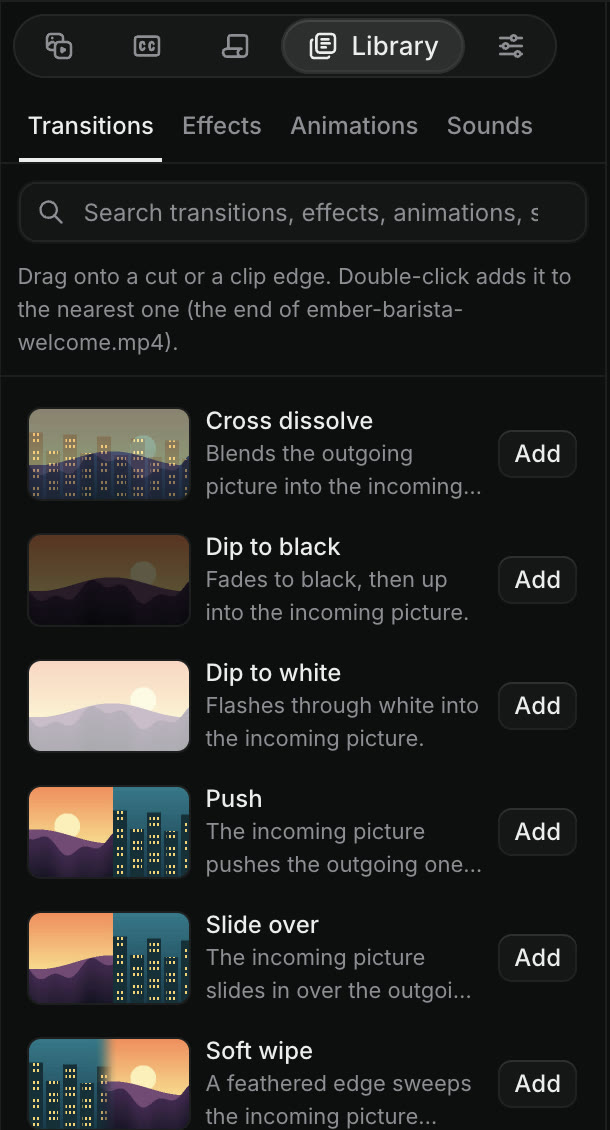
Library, then Transitions, in the Craze editor, with a search box, a hint that reads Drag onto a cut or a clip edge, and Cross dissolve, Dip to black, Dip to white, Push, Slide over and Soft wipe, each with an Add button.
Craze transitions in the Library, each with an Add button.

What are the Craze transition shortcuts?

Craze has two keyboard shortcuts for transitions, both using the default transition, a one-second Cross dissolve:

ActionMacWindows
Add a Cross dissolve to the cut nearest the playhead⌘DCtrl+D
Add a Cross dissolve to every cut between the selected clips⇧DShift+D

⌘D works on the active video track. ⇧D works on every cut where two selected clips meet, so select two or more clips first. Both shortcuts work in Edit mode, not in Animate mode.

How do you change a transition in Craze?

To change a transition on the Craze timeline:

  • Change its length. Drag either end of the transition. Or right-click it, choose Set transition duration…, type a timecode such as 00:00:01:00, and click Apply duration.
  • Change where it sits. Right-click it and choose Center at cut, Start at cut or End at cut.
  • Change its settings. Select it and open Properties. The Transition section shows its settings, such as the direction of a Push.
  • Remove it. Right-click it and choose Clear, or select it and press Delete.

What are whole-picture transitions in Craze?

Whole-picture transitions in Craze move everything on screen through a cut together. Zoom through, Whip through and Spin through sit on an adjustment layer over the cut and move every track below them, so titles, logos and video all zoom, whip or spin as one. Find them in Library, then Transitions, and drag one onto a cut like any other transition.

You can also drag any transition onto the start or end of an adjustment layer. The layer's effects then come in or go out gradually instead of switching on or off at once.

Can the Craze agent add transitions for me?

Yes. Ask the Craze agent in the chat, for example "add a quick cross dissolve between every shot" or "use a whip through for the cut to the product". The Craze agent uses the same transition Library you see, and its transitions appear on the timeline where you can change or remove them by hand.

Questions people ask

Open Library, then Transitions, in the Craze editor and drag a transition onto the cut between two clips. Or press Cmd+D (Ctrl+D on Windows) to add a one-second Cross dissolve at the cut nearest the playhead.

Yes. The whole-picture transitions in Craze, Zoom through, Whip through and Spin through, move every track under them through the cut, titles included.

Yes. Drag either end of the transition on the Craze timeline, or right-click it and choose Set transition duration… to type an exact length.

PreviousCaptions and transcriptsNextEffects
Table of contents
  • Where are transitions in Craze?
  • Which transitions does Craze have?
  • How do you add a transition in Craze?
  • What are the Craze transition shortcuts?
  • How do you change a transition in Craze?
  • What are whole-picture transitions in Craze?
  • Can the Craze agent add transitions for me?
  • Direct
  • Create
  • Edit
  • Models
  • Pricing
  • MCP
  • Contact us
  • Docs
  • Blogs
  • Changelog
  • Privacy
  • Terms
  • Instagram
  • YouTube
  • X
  • LinkedIn
  • English
  • 日本語
  • 한국어
  • Español
  • Deutsch
  • Français
  • Português
  • 简体中文

© 2026 Craze Technologies